Blog

  • Exciting Updates for 3CX Live Chat Plugin [2026]

    Exciting Updates for 3CX Live Chat Plugin [2026]

    At WPNeon, we cover exciting plugins that help you build your business with WordPress. One such plugin, 3CX Live Chat, received a great reception from our audience.

    Recently, 3CX Live Chat Plugin saw some exciting changes, and that’s why we are here. Today, we’ll cover the new exciting features of the 3CX Live Chat Plugin and discuss its significant changes.

    Also read: 12 Best WordPress Survey Plugins for Collecting User Feedback or Adding Online Polls

    Before we start, let’s make one thing clear. It is still free. And, if you found its installation process tedious, you’ll find the new updated installation way easier (we’ll cover it in this post).

    What other changes did the 3CX Live Chat Plugin bring? Let’s get started.

    What is the 3CX Live Chat Plugin again?

    If you landed here, and don’t know about the 3CX Live Chat plugin, let’s do a recap.

    3CX Live Chat Plugin is a popular WordPress plugin. It offers a reliable and tested live chat solution to your WordPress site without the need to go through complex installation or maintenance. At the time of writing, it has 30,000 installations. Pretty impressive!

    The plugin solves the core pain point of your customers, i.e. seamlessly connects with a real agent so that they can connect and solve the problem. Moreover, its support for integrated voice and video calls makes it more human-friendly.

    Furthermore, the plugin is free to use as part of 3CX StartUP plan for up to 10 users. For more sophisticated contact center features and additional users, there’s always an option to upgrade to StartUP Pro or editions designed for larger companies.

    However, even the free plan includes a full range of features. For instance, it:

    • Improves sales by connecting customers and potential leads in real-time.
    • Increases collaboration between teammates with forward chat functionality to either a specific agent or to a group of agents to tackle more complex issues
    • Enables conversion to a live call or videoconference without the need for number dialing or additional phone bill charges.
    • Allows to switch between chat to voice to resolve calls faster.
    • Offers a complete integration with SMS, WhatsApp, and Facebook.
    • Get proper customer identity and bring up contact records using available CRM integrations.
    • Enables a complete chat box customization with zero coding required.
    • Gives access to live chat records.
    • Enables customer satisfaction ratings

    And much more!

    Check our 3CX Live Chat Plugin review to learn more about the plugin.

    3CX Live Chat Plugin: what has changed? A Summary

    So, what has changed? If it’s not the price, then what is it?

    Let’s summarize it below to give you a clear idea of what you can expect from the 3CX Live Chat plugin the next time you pick it up.

    • Change 1: The installation and setup process has been drastically simplified. You don’t need to have any prior tech knowledge or an in-house IT team to setup and customize the plugin according to your needs. The whole process takes up only a couple of minutes from start to finish.
    • Change 2: The 3CX Live Chat plugin is now part of a free StartUP edition. This is beneficial for small businesses that can centralize communication without the need to pay anything.
    • Change 3: You can now fully customize your live chat to fit your needs with no prior coding experience! Adjust the appearance of your chat bubble to match the style of your website, pre-define your own custom greetings, ensure GDPR compliance and set your ‘Default Agent’ to protect your team members’ identity. Get it all done in just 2 minutes!

    These significant changes bring a better omni-channel experience to companies to enhance their customer experience, as well as guarantee a smooth workflow for their agents.

    3CX Live Chat Plugin Updated Installation Process

    The installation process got overhauled completely by 3CX. It is now made simpler. Let’s go through the process below.

    Step 1: Sign Up, Choose Plan, And Create 3CX Live Instance.

    First, you must go to the 3CX website and sign up for a StartUP account. It’ll ask you for basic details. Once filed up, tick “agree to license agreement” and click Next.

    It’ll then ask you about which 3CX you need. Currently, they offer 3CX Hosted or a self managed instance that’s a better fit for larger enterprises.

    • Once you’ve selected 3CX Hosted, you need to choose Up to 10 users – 3CX StartUP option to access your free 3CX StartUP account and click Next.

    Once done, it’ll create your 3CX StartUP instance and prompt you to create users.

    In the add users section, you can add up to 10 users (per your plan selection).

    Let’s add a couple. Also, during new user creation, you can set their role as

    • User
    • Receptionist
    • Group Administrator
    • Manager
    • Owner
    • System Administrator
    • System Owner

    Once done, click on Next to proceed.

    Step 2: Setup Live Chat

    In this step, we begin setting up live chat on the site. It’ll ask you for confirmation to proceed with the process. You’ll need to fill in all the necessary information. Once done, click on Next.

    It’ll also warn you that if you leave the process, the entire data will be lost. You must do it again if you somehow lose the connection or quit before completing all the steps.

    It’ll set up your 3CX systems where you need to log in. Click on your client URL and log in with your extension ID and password.

    Once done, it’ll redirect you to the 3CX Web Client. This is your communications hub for all of the future communication and system management. All of the message integrations will be available through here and synced between devices, regardless whether you are accessing your account from your iOS or Android app or the Web Client. .

    Step 3: Configuring Voice and Chat From System

    The portal will look below.

    Now, you need to click on Admin in the bottom left and then choose “Voice and Chat

    It’ll open up your live chat already set up. To further customize it, you need to click on it.

    Now click on it or click on the right Configuration Icon.

    It’ll open up all the options for customization. Here, you can choose which visitor information you want to capture or allow only chat, phone, or chat. There are also other options, including

    • Styling
    • Messages
    • Agent
    • Advanced.

    Under the Advanced tab, you get to enable privacy controls. All in all these options will help you customize your website to match your branding and give a more native feel.

    Step 4: Download and Install the 3CX Live Chat WordPress plugin.

    The last step is to download and install the 3CX Live Chat plugin. Once installed, activate the plugin.

    You need to input the generated URL you got during the 3CX Live Chat setup.

    Furthermore, you can also choose the pages on which the live chat will show.

    Step 5: Test it on your site.

    Lastly, you can now go to your site and refresh it. You will now see a chat button on your site. Click on it and send a message. The message should pop up in your system and can be replied to.

    You can also test out the call function.

    That’s it. Congratulations, you have successfully installed the 3CX Live Chat plugin.

    Note: If you’re installing 3CX Live Chat on a non-WordPress site, you must copy and integrate the HTML code manually.

    Calling capabilities and team collaboration features

    3CX Live Chat is one of the unique offerings that offer calling capabilities and team collaboration. In addition, once every team member is connected to the system, it provides limit-free enterprise-level video conferencing. Moreover, it is free, secure, and easy to use.

    Now Part of the StartUP free edition

    3CX StartUP is a free to use communication platform. It is also easy to set up, where you can do calls, live chat, video conferencing, and even team communications. It helps businesses to incorporate sophisticated features such as ring groups, call and chat reporting and IVR without the need to spend a fortune. The 3CX Live Chat is included in the StartUP Free edition. So, if you’re a small or medium-scale business, you can easily use it to run and even scale your business.

    All you need to do is sign up for a 3CX account and activate voice and chat features.

    Final Thoughts

    3CX Live Chat has come a long way. These new updates add worthy features and more importantly, ease and convenience for the end user. Moreover, it is still free to use, which makes it more valuable than before.

    So, what do you think about the 3CX Live Chat plugin and the StartUP Free edition? Comment below and let us know.

  • Best Church WordPress Theme [2026]

    Best Church WordPress Theme [2026]

    When you hear the word “Church”, besides its literal meaning as a house of worship, you think of a place that is usually void of technologies. Most churches even ask you to keep your phone in silent mode for obvious reasons. Churches are there to give us faith. And faith comes through hearing. It doesn’t matter if the sermon is conveying his message through traditional mediums or through technology.

    Also read: The Best WordPress Podcast Plugins to Grow Your Audience

    This pandemic tested our faith and churches began to take their communal services online. So, instead of just taking your weekly communal worship online, why not take the whole church online. This is what this article is here for. It lists some of the best church WordPress themes for 2026 to help you easily take your services online.

    Best Church WordPress Themes


    Although churches are one of the remaining institutions that still functions on traditional norms, they can benefit greatly if it adapts to the modern technological world. When you take your church online, you not only attract wider audiences but also convey your message with clarity. The power of the internet will allow you to do that. You can also show what you’re doing to the community and increase the flow of donations.

    When your reach is worldwide, you can expect a lot of donations which you can use to do good. And if your church sees a lot of events, having a place to neatly organize it will make your work a whole lot easier. These are only some of the things that will be made easier with a decent and functional website with a good church theme. So, without further ado, let’s look at some of the best church WordPress themes for 2026.

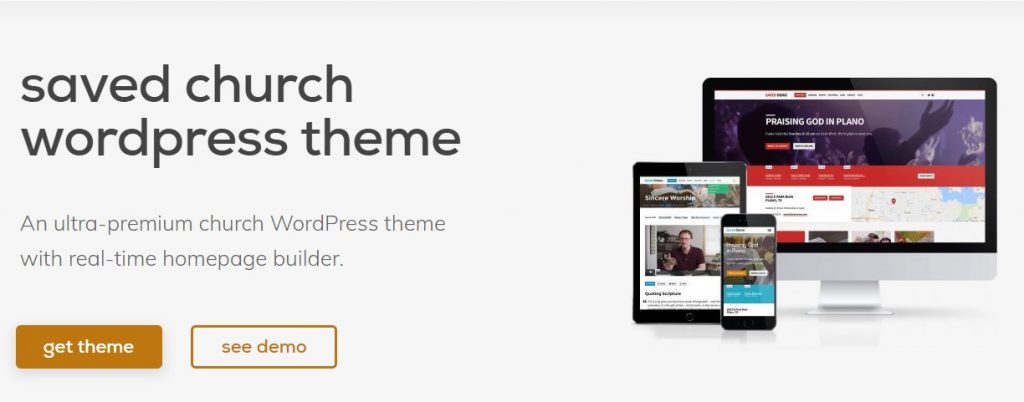
    #1. Saved

    Church WordPress Theme
    Running a church is in no way an easy job. The thing you have to manage can sometimes make you feel overwhelmed. Communal services and events are only some of the things you need to handle. So, why not let Saved lighten the load you have on your shoulder?

    This magnificently designed church theme for 2026 will take your church to the next level. This church theme is designed to display all the essential information on the homepage so your visitors will stay updated. And the tons of customization options ensure you can construct a beautiful church website that makes use of both beauty and functionality.

    The inclusion of the Church Content plugin means you’re in good hands. You don’t have to worry about sermons or events. The theme takes care of it all. With Saved, you can easily create dedicated pages with ministries information, testimonials, and more. The galleries it comes with will have you beautifully showcase who you are, what work you’ve done for the community, and the events you’ve helped perfectly.

    All these can be done easily with the help of included drag and drop builder that eliminates the use of even a single line of code. You can add a video background, or stick with an image or solid colors. The whole theme is completely responsive with custom fonts, animations, archives, and stick notes. If you’re not the one to waste time by manually customizing the whole theme, you can use the started content to help you get off the ground in no time.

    You can get this one for $129 per month for a single website. You will also get access to all the themes that Church Themes offers.

    Explore Saved

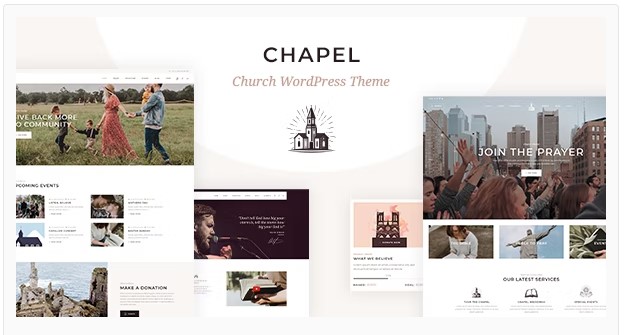
    #2. Chapel

    Church WordPress Theme

    Having a dedicated website for your church allows people to stay connected 24/7. They don’t have to wait for Sunday to attend the communal services. And Chapel might just be the perfect church theme for 2026 that meets all your church needs.

    This modern-looking elegant WordPress church theme is designed without cutting any corners. The elegancy of this church theme matches the functionalities and features a good church theme requires. There are plenty of layouts and pages that you can combine and customize to match the aesthetics of your website with your church.

    You don’t even have to worry about tweaking this theme as it requires no prior coding knowledge and everything can be done with easy-to-use WPBakery Builder. This church WordPress theme lets you beautifully present sermons in video formats to let users attend them in their free time.

    Huge collection of typography, the inclusion of several paid WordPress plugins, compatibility with multiple WordPress plugins like Event Calendar and GiveWP, social media integrations, supports for audio and videos, beautiful animations – these are only some of the features that make Chapel one of the best church WordPress themes for 2026. This theme may look complicated, but the developers have made it really easy to work with and customize.

    Chapel can be yours for $69 with future updates and extendable 6 months of support.

    Explore Chapel

    #3. Maranatha

    Church WordPress Theme

    Your search for exceptional church WordPress themes for 2026 brought you here. Good thing you didn’t have to scour the internet to find one. Maranatha is one exceptional church theme designed to bring our congregation together more often.

    With tons of innovative features and a soothing overall design, Maranatha can help you get your church website up and running in no time at all. The long homepage lets you add all the essential elements and features for easy access and the included parallax scrolling makes it more elegant.

    Moreover, this WordPress church theme comes with a sticky menu for easy access, responsive and mobile-friendly designed so that your flock can get connected wherever they are, easy and real-time customization to make it easy for you to mold the theme as per your preference, and a collection of layouts, page type, and demos to help you get your website up and running with minimal effort.

    If you’re still not impressed, then this 2026 theme for churches also has an events calendar, ministries section, blogs posts, and a way to showcase all the work your church has done for the community. Like all the themes from Church Themes, Maranatha also supports sermon podcasting, photos and videos, and live stream.

    Maranatha has 3 different packages priced at $129, $199, and $299 per your respectively. This price is not for this theme alone, but for access to all the themes that the Church Themes offer.

    Explore Maranatha

    #4. My Religion

    Church WordPress Theme

    When everything is basically in the palm of your hand, wouldn’t it be unwise not to help your congregation whenever and wherever they are? My Religion is a theme for the changing times, and it’s time to put your services online.

    This church theme for 2026 is truly a modern theme that doesn’t lack elegance or functionalities. Neither you nor your congregation will have any hard time navigating the website. Everything essential is right there on the home page. For those who couldn’t attend a sermon, you can still reach theme as this theme allows you to post them online.

    You can showcase your best sermons for the whole world to see, or even feature them on the homepage. My Religion WordPress church theme acknowledges that churches run on donations, so the developers have included the feature that allows people to easily give donations and you to easily receive them. This is all possible due to the include CMSDontaions WordPress plugin.

    With this magnificent church theme for 2026, you will no longer frustrate yourself handling events at your church. The compatibility with Events Calendar WordPress plugins ensures that. And if you want to collect money other than donations, then the support for WooCommerce will allow you to do so with ease. The customizations are nothing to be worried about as it is not only easy but theme options this theme comes with will allow you to make the website of your dreams.

    There are plenty of layouts, widgets, shortcodes, and a couple of premium WordPress plugins.

    You will get this church theme with guaranteed future updates and 6 months of extendable support for just $59.

    Explore My Religion

    #5. Holy Church

    This multipurpose church theme is designed for churches but it can handle anything from charity, prayer community to any non-profit you could think of. It looks simple but the features it comes loaded with will make you take a second look.

    Out of the box, Holy Church comes with the Events Calendar that enables you to organize all your church events and also makes it easier for your congregation to keep up to date with the church’s schedules. The overall design is very soothing. The whole framed pages style does not only make the website look beautiful, but it also serves a purpose.

    You can put clickable elements on the border to make the most out of a single page. You can import a demo with a click and start working with it and there are tons of customization options and layouts if you do not want to start from scratch. Holy Church also comes compatible with WPBakery Page Builder and if you do not own that, then the included drag and drop page builder will do just fine.

    Moreover, there are tons of shortcodes ready to be placed, a powerful admin dashboard, mega and sticky menus, a parallax background, and much more. And if these are not enough for you, Holy Church makes it easier for you to add more features as it supports multiple popular WordPress plugins such as Revolutions Slider, Book Appointments, Essential Grid, MailChimp, Contact Form 7, and more.

    The regular license for the Holy Church WordPress church theme will cost you $59. It comes with future updates and 6 months of support.

    Explore Holy Church

    #6. Jubilee
    Church WordPress Theme

    When you have made the decision to give your church an online presence, Jubilee is one of the best ways to start. It is one of the most popular church themes available on the market that includes every church-related feature you’ll ever need.

    Jubilee is not only a responsive and elegantly designed church theme for 2026, but it is also extremely fast. No one wants a pretty website that struggles to keep up with constant traffic, do they? Even if the theme is built with a church in mind, you still need to make some alterations to describe your church accurately. That can be handled easily with Jubilee.

    It comes with a powerful customization tool that lets you play around with colors, fonts, and other design elements with ease. Powered by the Church Content plugin, this WordPress church theme can help you take care of events, sermon archives, blogs, testimonies, and more without any hassle. It is easy enough for beginners and flexible enough to mold it however your preferences allow you to.

    Jubilee also supports social media integrations for you to easily promote your church and attract more visitors. There are call-to-action buttons, sticky notices, sermon podcasting, team profiles, ministry pages, church-specific widgets, and more.

    The Starter pack will cost you $129 per year. All the packages have all the features with the only difference being the number of sites you can use the theme on. The price will also give you access to all the themes from Church Themes.

    Explore Jubilee

    #7. Vestry

    Church WordPress Theme

    For those who want to keep it minimal yet elegant, Vestry will make you drool. The features this 2026 theme for the church comes loaded with will not only make your website look great, but also help it make a thriving community of religious people and a place to help them connect.

    Vestry, at the first glance, looks grand. Everything about it looks elegant. The full-screen image on the home page, the beautifully designed minimal header and social integration buttons, and the call-to-action button compliments the whole aesthetic – there’s nothing that looks out of place. This layout is not what you’re stuck with though.

    There are around 30 different pages that are all fully customizable and can be forged into something that suits your preferences.

    Vestry also comes with dedicated pages to describe your missions, organize sermons, ask for donations, and keep your visitors up to date with all the upcoming events. To make your work easier, Vestry comes fully compatible with Contact Form 7, Give donation plugin, Events Calendar. You can use Elementor to customize the theme or if you prefer Gutenberg, you can use that too. Vestry is truly one of the best church themes for the year 2026.

    This church theme for 2026 will cost you $59 with up to 12 months of support and future updates.

    Explore Vestry

    #8. Alone

    Church WordPress Theme

    Alone is a multi-purpose WordPress theme designed for anything non-profit. That includes any NGOs, Campaigns, and of course Churches. What you can do with this WordPress theme is entirely in your hands. It has all the essential features; all it lacks is your touch and it will easily convert into a beautiful Church theme for your website.

    With over 30 different and magnificent demos, you will see that there are more than enough options for a church website. Each of the demos is responsive and customizable to the tiniest element. If you want to start from scratch, there are more than 40 different elegant homepages, over 10 different headers, unlimited color options, and much more.

    You can combine every single element with ease and without coding skills. With this theme, you can create something truly magnificent that compliments your church and allow your people to attend sermons, donate for good cause, and much more. This church theme for 2026 is developed with a focus on optimization and high performance.

    It is very lightweight with super-fast speeds. This fully responsive WordPress church theme is also SEO optimized to ensure high ranking. Alone is super easy to install and comes with several elements that allow you to showcase your works, stories, and process donations with no hassle. It is one ideal church theme – no doubt about that.

    For $59, Alone offers all its features, future updates, and extendable support.

    Explore Alone

    #9. Hallelujah

    Church WordPress Theme

    Like how your congregation rejoices when worshiping and praising the Lord, you will do the same when you see this theme in action and shout hallelujah. You will find out that this is one of the best church WordPress themes for 2026 once you see how elegant and feature-packed it is.

    This modern church theme is designed for anything non-profit. From a church to charity and volunteering, Hallelujah is fit for all. This magnificent WordPress church theme not only allows you to display sermons but also lets you add ministry pages, showcase events, display staff and include locations to help people find their way to you easily. You can also live-stream your services with ease.

    The pre-built pages and tons of layouts it comes with allow you to customize every single detail with no additional hassle. Furthermore, the compatibility with Elementor lets you use your favorite page builder to do all the work.

    Hallelujah is designed to be intuitive, responsive, and 100% user-friendly. If all the customization options and features that come pre-loaded with the theme aren’t quite complete for you, then Hallelujah supports tons of popular WordPress plugins including Slider Revolution, Essential Grid, Contact Form 7, MailChimp, and more.

    There are multiple blog layout variations that support stickies, media, links and come with beautiful galleries. The fully responsive nature of the theme guarantees that all the images, depending on where they are used, get scaled appropriately. This 2026 church theme is both flexible and absolutely beautiful.

    Hallelujah will cost you $59 which also includes 6 months of extendable support and future updates.

    Explore Hallelujah

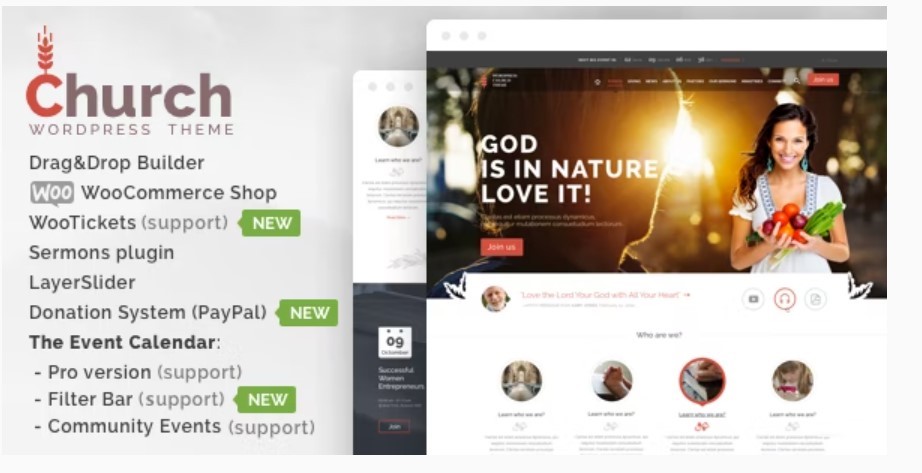
    #10. Church

    Church WordPress Theme

    To get on the list of the best church WordPress themes for 2026, a theme needs to not only be loaded with all the essential features that would ease the process of running a church online but also look really good doing so. Well, Church and Events has it all.

    Let me start by stating the obvious – using this theme and customizing it requires zero coding skills. It comes with a beautiful parallax effect that you can use to showcase your church or the work you have done. There are plenty of customization options to play around with.

    Plenty of headers and footers, multiple layouts options, a one-page style menu, sticky headers, and much more. All you have to do is take your time to combine all the elements to come up with the style that suits your preferences. There are over 30 different readymade pages that are waiting to be used. This will also drastically reduce the customization time.

    The whole theme is designed to be fast, SEO friendly, and fully responsive across all devices and platforms. Moreover, if you want to expand the functionalities in the future, the compatibility with popular WordPress plugins such as WooCommerce, LayerSlider 5, bbPress, Events Calendar, Contact Form 7, and more ensure you can do so easily.

    The theme is available at Theme Forest for a heap price of $79. This includes future updates and extendable support.

    Explore Church

    #11. Grace

    Church WordPress Theme

    Running a church is much more than just organizing a communal service once a week and a couple of events in a month. It is much more like running a full-fledged business. There is a lot of work to be done to attract more people to your congregation and make them stay. So, a church website with themes like Grace will undoubtedly help ease some things.

    The whole theme is based on minimal modern design, without cutting corners on the amount of information and clickable design elements available on the homepage. There is probably nothing you can’t do with this theme. This is in regard to the thing there is to be done on a church website, of course.

    The features it comes with proves that. Grace WordPress church theme comes packed with a powerful donation plugin, events plugin, gorgeous galleries, tons of blog layouts, and a plethora of usable shortcodes. You can even add podcasts and sermons on your website if you want to. The included Visual Composer makes the customization experience fun and easy. And the powerful themes panel enables you to customize the theme to your heart’s content.

    There is a media content manager, custom theme options, and shortcode builder for more flexibility. It also supports powerful plugins like WooCommerce, WPBakery, Essential Grid, PO Composer, and Events Calendar.

    For $59 you will own this theme and get future updates with 6 months of dedicated support.

    Explore Grace

    Honorable Mentions

    These are some of the 2026 themes for churches that didn’t make the main list but are still worthy and equally featureful.

    • Bethlehem: Intuitive and powerful theme for non-profits.
    • Deeds: Church and non-profit theme with tons of home layouts.
    • Prayer: Simple, easy to use, and get the job done.
    • Adore Church: With multiple paid plugins and great design.
    • Salvation: Clean, powerful, and easy on the eyes.
    • Indigo: Minimal design with parallax effect.

    Conclusion – Best Church WordPress Theme

    This is it. These are what we think are the best church WordPress theme for 2026. Every single one of the themes is almost identical when it comes to features. You could just close your eyes and pick one. Unless you’re very specific on the design, any of the aforementioned themes will make your church website looks great and perform well.

    The customization options on these themes are pretty broad so I doubt you will find a theme that cannot be molded into the website of your dreams. Well, in the end, it is the features like sermons, events, and donations that make a good WordPress church theme, and all of these have them. If you have chosen a church theme, then you better start building. Good luck.

  • Best WordPress Call to Action Plugins: Top 10 Picks

    Best WordPress Call to Action Plugins: Top 10 Picks

    Call to action or popularly known as the CTA play a crucial role in your personal or business website. These plugins help you set the desired path for your visitors or guide them in performing an action. Depending on the type of website you run, you might want to guide your visitors to sign up for a membership, enlist themselves to your email list, fill up a form, sign-up for an event, and more. Also read: Top 7 WordPress Button Plugins The 9 Best Social Content Locker WordPress Plugins You can even use the call to action plugins to drive your traffic to a product on your website that is currently hot or on sale. If you use WordPress call to action plugins wisely, you can significantly boost your website’s conversion rate. These are only some of the use cases of WordPress CTA plugins. And since the call to action WordPress plugins are such a useful tool, there are tons of them in the market. This article aims to aid you in finding the perfect one for you from the pool of the best ones. Here are the best WordPress call to action plugins.

    Best WordPress Call to Action Plugins


    Some of the call to action plugins below are free while some will cost you money. The paid versions will most likely have a trial version your can use before deciding to go for the premium version. Although the fundamental functions of the plugins listed below are the same, other features will differ. Some come with basic features while some have features that are more advanced. So, without further ado, let’s look at some of the best WordPress call to action plugins available in the market. All the plugins in this list are in no particular order.

    #1. HubSpot WordPress Plugin

    Best WordPress Call to Action Plugins

    Download HubSpot WordPress Plugin

    HubSpot offers a free WordPress plugin that you can upgrade to the premium version for additional features. This call to action plugin ensures your website captures visitors through forms and pop-ups. After a visitor completes an action, all the information is sent to your HubSpot account and organized neatly. There you can know your customers’ behaviors and their interaction with your website. HubSpot call to action plugin for WordPress requires no coding skills and is extremely easy to use. After setting it up without any hassle, you can track the analytics and visitors’ engagements. Also, HubStop integrates seamlessly with tons of WordPress plugins like WooCommerce, Stripe, Gravity Forms, other 900+ apps, and plugins. Moreover, you can also create beautiful email marketing campaigns, set up automated marketing, and adding chatbots. While you can do a lot with the free plugin, you will need to opt for a premium plan when your website grows. The Starter pack starts at $45 per month for 1,000 marketing contacts.

    #2. OptinMonster

    Best WordPress Call to Action Plugins

    Download OptinMonster

    OptinMonster is one of the most popular conversion plugins for WordPress that also let you add CTAs on your pages easily without writing a single line of code. This call to action WordPress plugin helps you generate more leads, decrease cart abandonment, increase subscribers, and more in only a few clicks. With OptinMonster, you can create a visually stunning and lucrative offer that will make your visitors curious and ultimately make them stay longer on your website. Creating a good-looking CTA is a piece of cake with OptinMonster. This call to action plugin lets you choose from tons of beautifully built templates that you can just drag and drop to your canvas. With features such as InactiveSensor and Campaign Scheduling, OptimMonster detects inactive visitors and sends them email campaigns to coverts them into subscribers. All you have to do is set up an email campaign and let OptinMonster do all the work. OptinMonster call to action WordPress plugin comes with well-made forms to capture leads, multiple types of forms, split testing functionality, advanced traffic redirection features, and much more. The Basic plan goes for $14 per month and comes with unlimited campaigns, list segmentation, simple reporting and analytics, and much more.

    #3. Beaver Builder

    Best WordPress Call to Action Plugins

    Download Beaver Builder

    Anyone who has worked with WordPress before has surely heard about Beaver Builder. It is one of the best drag and drop builders available for WordPress. It not only helps you create stunning websites with minimal effort and zero coding, but it is also an excellent plugin for creating call to action buttons. After creating a good call to action button, you can drag and drop it anywhere on your website. It is that easy. Beaver Builder is an excellent call to action WordPress plugin that also lets you customize your CTA buttons with ease. You can modify your CTAs whenever you want, place them wherever you want, and customize them whenever you want. Change the colors and style, add a link, modify the fonts; you’re in control. The cheapest and basic plan will cost you $99 per year and offers your unlimited websites, page builder plugins, and excellent support.

    #4. Thrive Ultimatum

    Best WordPress Call to Action Plugins

    Download Thrive Ultimatum

    Thrive Ultimatum is a part of Thrive Suite that is marketed as the ultimate scarcity marketing tool. It also is one of the excellent WordPress CTA plugins. The main theme behind this plugin is making your visitors covert better by making them scared of missing out. This basically means making your product available for only a limited time. With this call to action plugin, you can run unlimited campaigns and call to action elements. This easy-to-use WordPress CTA plugin allows you to play CTAs on the top bar, sidebar, or any other specific locations on your website. And, doing so is as easy as you want it to be. All you have to do is create a CTA with the visual builder and place it anywhere you want to. There are tons of customizations options, everything can be dragged and dropped, and allow you acc to all the plugins and themes in the Thrive Themes suit. This call to action plugin also lets you add multiple CTAs on the same page. Thrive Ultimatum is a part of Thrive suit. It will cost you $19 per month to get access to Thrive Ultimatum and all the other goodies included in it.

    #5. Convert Pro

    Best WordPress Call to Action Plugins

    Download Convert Pro

    Convert Pro is a sure-shot way to increase conversions and subscribers. It is essentially a list builder plugin that lets you create call to action pop-ups, slide-in, and much more. Developed by the creators of the acclaimed Astra theme, this all-in-one lead generation and the opt-in plugin is also an excellent call to action WordPress plugin. Working with Convert Pro is pretty easy. You can start from scratch or use the available templates then start customizing as per your preference. The customizations can all be done with the included visual drag and drop builder. Later, you can start adding your strategically placed CTAs and track your visitors’ behaviors with the included analytics. Convert Pro regards advanced targeting in the CTAs and uses personalization technologies to help convert better. The integration with Google Analytics is added benefit. This email list builder and call to action plugin is available for $99. You will get features like a drag and drop editor, templates, popups, full-screen call to action, and more.

    #6. Bloom

    Best WordPress Call to Action Plugins

    Download Bloom

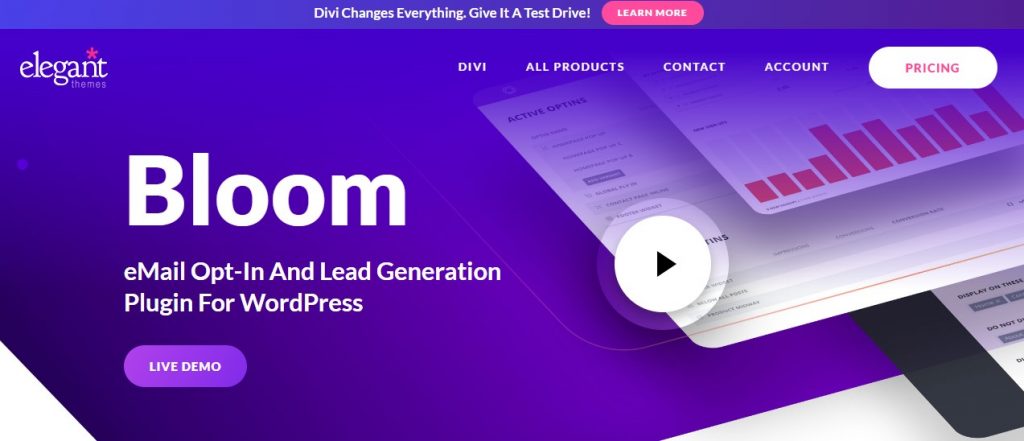
    Brought to you by the masterminds behind Elegant Themes, Bloom is an email opt-in plugin built to let you experience guaranteed growth in subscribers. Creating a strategic CTA is hassle-free with Bloom. There are over highly customizable 100 templates at your disposal for various CTAs like popups, widgets, and fly-in. With Bloom, you can place CTAs throughout your entire WordPress website or only on specific places if you prefer a more targeted approach. After you have created the desired CTA, all you have to do is use the provided shortcode and place it anywhere you want. Bloom also lets you go a step further with their content CTAs. This makes a visitor provide their information to view specific content on your website. All the collected information can be viewed from your Bloom dashboard and can be used to feed other integrations like MailChimp and HubStop to create a great email campaign and more. Bloom is available either for a year or for a lifetime. The yearly package will cost you $89 and give you access to all the themes from Elegant Themes and hundreds of website packs. If you choose the lifetime package, you will get access to all the themes, website packs along with a lifetime of premium support and website usage.

    #7. WP Notification Bar Pro

    Best WordPress Call to Action Plugins

    Download WP Notification Bar Pro

    Apart from its obvious usage of adding custom notifications and alters on your WordPress website, WP Notification Bar Pro is also an excellent tool to grab your visitors’ attention using high quality and high visibility call to action. This call to action WordPress plugin comes with a number of notification bar content types including simple text, email opt-in, countdown CTAs and more. Even playing around with CTAs is easy. All you have to do is create a CTA with the desired content, customize it to your preference, and use the provided shortcode to place it. You can be specific with your call to action. You can make the CTAs appear only on certain devices or traffic sources. All the collected data can help optimize the conversions with the help of analytics. WP Notification Bar Pro has a demo version you can check out before deciding to spend money on the premium plan. This call to action WordPress plugin will cost you $29 for unlimited websites.

    #8. Ultimate Blocks

    Best WordPress Call to Action Plugins

    Download Ultimate Blocks

    For all those who are unsure of spending premium price for just a small feature or those who only one call to action plugin features instead of all the additional goodies, this plugin is for you. Ultimate Blocks is a free blocks plugin for Gutenberg that comes with a CTA block. If your website is still in its infancy and with low revenue, this plugin is like a blessing. This WordPress CTA plugin and blocks plugin comes with tons of useful blocks including CTA, testimonial, post grid, slider, and more. With Ultimate Blocks, you can add a beautiful call to action box with a button that encourages your visitors to take the specified action and help them engage more. Every single element on the block is customizable. Ultimate Block can be yours for free of charge from the WordPress repository. You can demo each of the included blocks from its plugins page.

    #9. BoxZilla

    Best WordPress Call to Action Plugins

    Download BoxZilla

    BoxZilla might be a lightweight call to action plugin for WordPress, but it packs quite a power. You can create beautiful CTAs and make them visible when the user scrolls down to a certain position. You can also set them to appear at a certain time. The call to action created using BoxZilla is triggered when a user scrolls down to a certain percentage point or after scrolling to a certain element on the webpage. You can add any content you want to the CTA box. As the plugin supports integrations with multiple popular WordPress plugins, you can even add signup forms, subscriptions forms, memberships forms, discount offers, and more on the call-to-action popup box. BoxZilla comes with multiple triggers like time on the website, page views, scrolls, exit intents and more to help you strategically place various call to action all over your website. The pricing starts from $48 per year for 1 website, premium add-ons, and priority support. The price goes up to $112 for 10 websites.

    #10. Elementor

    Best WordPress Call to Action Plugins

    Download Elementor

    Elementor is arguably the best and most popular drag and drop page builder for WordPress. It is not surprising that this tool can also be used to build other elements on a website including a call to actions. This page/call to action WordPress plugin is extremely newbie friendly too. A click here a drag there and you’re done. That’s how convenient this plugin is. Elementor comes with numerous design elements and customization options to help you create a beautiful and highly functional call to actions. You can use images, texts, and more to create CTAs and place them all over your website with ease. The call to action widget from Elementor works perfectly in grabbing your users’ attention with its stylish box containing a combination of relevant images and other content. You also add various animations and combine them with beautiful blend modes and filters to create a masterpiece. Elementor Call to Action widget in part of the Elementor Page Builder plugin which can be yours for $89 per year.

    Honorable Mentions

    Although the call to action plugins below couldn’t be added to the main list, they are no way less functional and feature full than other plugins on the list. They are an equally competent and useful call to action WordPress plugins. Let’s look at the honorable mentions:
    • Monster Insights: Google Analytics plugin with CTA buttons that track clicks.
    • Simple Side Tab: Free call to action plugin that sticks around when the user scrolls.
    • Hello Bar: Full-page popups and more.
    • WP Call Button: Call to action plugin that adds “click to call” button.
    • MailOptin: Lead generation and email campaign plugin with CTAs and analytics.

    Conclusion – Best WordPress Call to Action Plugins

    Adding an attractive call to action is a great way to engage your visitors and make them spend more time on your website. Although a great CTA might take a lot of trial and error, ultimately it will prove to be a great decision on your end. A good CTA makes it clear for your visitor to see what you have to offer. This is why choosing a good one among various good WordPress CTA plugins is a big decision. This is where our list comes in. take your time and go through all the call to action plugins listed in this article and choose the one that suits your preference.
  • How To Change WordPress Featured Image Size – Simple Guide [2026]

    How To Change WordPress Featured Image Size – Simple Guide [2026]

    Images play a crucial role in improving your site’s appeal. It improves your storytelling and engages the audience.

    It is important to customize featured images as it is the first image a reader sees. And that’s why it is important to get it right from the start.

    Also read: How to Hide Featured Image in Post WordPress

    In this article, we’ll look into ways how to change WordPress featured image size. Our methods will cover both approaches, i.e., setting up the sizes so that new featured images adjust to it automatically and also looking at WordPress plugins that let you resize already uploaded featured images. Furthermore, we’ll also take a look at how to customize WordPress-featured images in a child theme.

    Let’s get started.

    How To Change WordPress Featured Image Size


    What is Featured Image in WordPress? And, How to Set it?

    A featured image is the primary image for a blog post or page. It is presented first when a reader visits the blog post. That’s why its main function is to attract the visitor’s attention and invite them to continue reading. Additionally, featured images are shared via social sites and are helpful for SEO purposes.

    Every site has a different take on the featured image. In most cases, the WordPress theme you’re using determines the look and feel of the featured image, including its size.

    Despite the WordPress theme you’re using, you can follow the steps below to set a featured image in WordPress.

    • Log in to your WordPress dashboard.
    • Now open the editor for the page or post.
    • Click on the gear option to open the settings panel(located in the top right corner).
    • Now select Featured image > Set featured image.
    • Upload the feature image according to your choice or select from the media library.

    You may also want to add alt text, title, or caption during upload. Finally, click on “Set featured image.”

    Understanding WordPress Featured Image Size

    Before we proceed and learn how to change the featured image size, let’s learn about WordPress Featured Image size. By default, it is a good idea to pick up the featured image size as 1200 x 628 pixels. However, it completely depends on the site’s theme.

    The main goal is to match the theme layout and the user’s experience. For example, some sites have an ultra-wide layout where the featured image size goes up to 1600px width.

    Currently, WordPress comes with four image sizes. These include:

    • Thumbnail: 150 x 150 pixels
    • Medium: 300 x 300 pixels(maximum)
    • Large: 1024 x 1024 pixels(maximum)
    • Full size: Default original image size

    By default, WordPress-featured images and thumbnails share a default 150 x 150 pixels size. You must understand the role of each four image sizes. Whenever you upload a featured image, it gets four different image sizing. This is essential to bypass the need to resize featured images in smaller dimensions/sections across the theme.

    For example, suppose you upload a 1500 x 900 pixels image as a featured image. In that case, WordPress will automatically put the best resolution to the top of the post(or any other location for the featured image, depending on the theme).

    Next, it’ll create copies and use them in different sections without resizing the original image every single time.

    As each theme or site has different needs, let’s learn how to change the featured image size in WordPress in the following section.

    How to Change Featured Image Size in WordPress

    In this section, we’ll take a closer look at the methods required to change featured image size in WordPress. However, before we proceed, check your theme featured image dimensions and the option to change them. To do so, go to Appearance > Options. If you find the option to change your theme’s featured image size, do it. Otherwise, follow any of the methods mentioned below.

    Using WordPress in-built Image Resizer

    WordPress offers an easy way to change default image sizes. To get started, go to Settings > Media. You’ll now see the following image sizes option.

    How To Change WordPress Featured Image Size

    As you can see, you can change the width/height for thumbnail, medium, and large-size images. In our case, we have set the large size as 1170 x 736, which reflects the featured image size. The thumbnail and medium sizes are also changed according to the theme.

    Here, you can make changes and click on “Save changes.”

    Now, all the featured images uploaded will follow your preferences.

    Resizing Old featured images

    For older images, you need to either manually resize and replace them again or use plugins such as Force Regenerate Thumbnails or Simple image sizes. By installing Simple image sizes, you get additional image variant options.

    Customizing WordPress Featured Image With a Child theme

    If you want to customize your theme, you need to create a child theme. A child theme helps you to keep your customizations under control, even when the main theme is updated.

    Any new WordPress theme comes with a pre-defined featured image size. So, once you create a child theme, you can customize the featured image size.

    To get started, install a child theme. Once done, then you need to find the featured image name. For example, if you want to change the image size of the blog post, the name should be “blog-thumbnail.” Also, depending on your theme, the code can be in archive.php or another location. It should look like the one below.

    <div class=”featured-image”><?php the_post_thumbnail( ‘blog-thumbnail’ ); ?></div>

    Check the code by inspecting the theme elements to pinpoint the featured image. For example, on my site, it is “attachment-large.”

    Now, you need to add a function to customize the size.

    function themename_child_theme_setup() {

    add_image_size( ‘attachment-large’, 1200, 822, true );

    }

    add_action( ‘after_setup_theme’, ‘themename_child_theme_setup’, 11 );

    Here, we set 1200 x 822 as the featured image size. You can also opt just to set only width as well.

    And that’s it! You now need to regenerate your images with the help of the Force Regenerate Thumbnails plugin.

    How To Change WordPress Featured Image Size – Final Thoughts

    That’s it! You have successfully learned how to change WordPress featured image size. Doing your research beforehand is always a good idea before setting the featured image size. Also, it is vital to optimizing featured images from the start.

    In short, featured images boost your site’s visibility and SEO and give your content a meaningful way to connect to your audience. Customizing them is necessary as it’ll surely improve your site’s reach and user retention.

  • 15+ Best WordPress Sport Themes for Sports Websites

    15+ Best WordPress Sport Themes for Sports Websites

    Sports is not just about competitiveness and being on the side of the winning team or athlete. Its importance hasn’t changed much throughout human history. In ancient Greece, being an athlete was much more than just entertaining the public. Sports allowed people in ancient Greece to elevate their status in society.

    They would even represent their city in empire-wide tournaments and ultimately earn respect among the society and even their peers and competitors. Although the world has changed significantly, the sense of joy and togetherness that sports bring hasn’t changed a bit.

    Also read: 20 Best WordPress Soccer Themes

    Sports have become an unmovable part of our culture. And with the emergence of the age of the Internet, athletes and sports teams create their own websites to promote themselves and try to make a name for themselves in the cut-throat world of sports.

    I cannot give you the formula for developing an unbeatable team or becoming a ruthless athlete, but what I can help you with is the website. Whether it be a website for your sports team or for an individual athlete, WordPress has your back. To help you with it, even more, we have selected some of the best WordPress sport themes and athletics themes.

    Best WordPress Sport Themes


    The themes in the list below are designed especially with sports, fitness, and athletics in mind. The athletics themes and sports themes mentioned below are all highly customizable and can be adjusted easily to suit any sport, team, or athlete. All with minimal effort. So, without further ado, let’s check out some of the best sports WordPress themes.

    #1. Big Slam

    Best WordPress Sport Themes

    The name itself is designed to stand out. Big Slam isn’t meant to be caged, it is meant to get out there and make a name for itself. This is what the team who uses this WordPress sports theme is destined to do. One might think this sports WP theme is designed only for basketball due to its name, but that is not the case. The plethora of customization options that this sports theme comes with lets you morph it into a theme of any kind of sport imaginable.

    You get to choose from different headers, multiple layouts, unlimited colors, and more. Use them with any combination you want and you’ll have yourself an adrenalin-pumping website. That is not all though. the built-in easy-to-use grad and drop page builder makes your work so much easier as you do not have to touch a single line of code. Big Slam is fully compatible with WooCommerce too.

    Explore Big Slam

    #2. Oxigeno

    Best WordPress Sport Themes

    Oxigeno is designed and developed for sports teams and clubs of any type. From Football to swimming, this sports theme can be adapted into multiple sports. Everything about this WordPress theme is tailored for sports. This fully responsive and retina-ready WordPress sports theme comes with shortcodes developed for sports clubs and leagues. You will not run out of customization options as Oxigeno comes with multiple headers, layouts, and other customizations options powered by WordPress customizer.

    The included page builder guarantees easy customization and fast deployment. This WordPress Sports theme also sports WooCommerce to help you easily monetize your website selling team-related goodies. That is not all though. You also get custom icons, Google fonts, fast load time, and an overall great-looking sports website. The one-click demo option will save a lot of your time for sure. All you have to do is import an already designed demo and customize your way through it.

    Explore Oxigeno

    #3. Top Scorer

    Best WordPress Sport Themes

    Keeping up with all the upcoming matches, tech schedules, player profiles and all thing sports-related is not easy work if you try to do it all manually. However, if you have a good WordPress sports theme with all the sports features already included, it will definitely feel like a piece of cake. This is what the Top Scorer sports WP theme is all about. This powerful athletics theme is full of features and comes with aesthetically pleasing skin. You can even customize it to your heart’s content.

    Top Scorer comes with tons of beautiful ready-to-use demos, homepages, and a huge collection of design elements. There even are features tailored specifically with various sports in mind. What makes this theme one of the best sports WordPress themes in the market is its powerful administrator dashboard, tons of sports-related shortcodes, and inclusion of premium WordPress plugins for free.

    Top Scorer is also fully compatible with WooCommerce if you need to monetize your website a bit more. It is everything you will ever need to easily manage your sports team and help the fans stay up to date with everything team-related.

    Explore Top Scorer

    #4. Sports Club

    Best WordPress Sport Themes

    All your sports website needs can be easily fulfilled if you opt for this sports WordPress theme. Sports Club is designed to be the ultimate solution for those who would want a website that focuses on a particular sports event, sports league, sports clubs, or sports teams. The feature set Sports Club comes with makes it ideal for creating a website for your local sports team, sports news, sports products, and equipment shop, sports club fan website, particular sports event, and much more.

    Overall, this sports theme is extremely easy to use and equally easy to customize. It comes with Visual Content Composer plugin and tons of shortcodes that let you modify the theme as per your preference and vision. Even if you require a plugin that is not included in this athletics theme, you do not have to worry about it not working with the theme as Sports Clubs has a huge list of compatible plugins.

    Free premium WordPress plugins, SEO optimized, multiple pages options, beautiful animations, unlimited colors, drag, and drop customizer are what make Sports Club one of the best sports WordPress themes.

    Explore Sports Club

    #5. The League

    Best WordPress Sport Themes

    Hardly a month will pass by without any sports event. That’s how fast-paced the world of sports is. You will need a powerful and featureful WordPress sports theme that matches the energy of sports to keep up with all things sports-related. The League is that theme. The overall design is The League is pretty decent. What it excels in are its functionality and usability. With minuscule hassle, you can set up a top-class sports website that features sports articles, scoreboards, sports posts, schedules, and more.

    All you have to do is import a demo with a single click, customize it a bit and you have yourself a sports website tailored to your need. The League also lets you include video and audio posts, featured headlines, and a custom scoreboard. There are over 800 Google fonts to choose from, unlimited colors, and flexible ad spaces.

    Moreover, this sports theme is compatible with WooCommerce, bbPress and comes with YouTube integration. The League is all about information sharing. Every score, every match, and every sports gossip will find a home on your website.

    Explore The League

    #6. Endurer

    Best WordPress Sport Themes

    Endurer will have your website made and deployed within minutes. But that is not the reason why it is named the way it is. Endurer is a sports WP theme designed for clubs whose members are nuts about running. No matter if it is just casual jogging or running recreationally, Endurer is the theme you can rely on.

    It sports a sleek modern design with plenty of space for posts, portfolios, shops, and more. The entire theme can be easily customized. You can either start from scratch and build your way up or import one of the demos and modify your way through it.

    Either way, you will end up with a functional and beautiful website. This athletics theme comes with multiple homepages, tons of inner pages, sliders, various post types, and much more. You also get to use Slider Revolution and WPBakery Page Builder for free if you choose this sports theme.

    There are more goodies packed in it though. Mega menus, parallax effect, social media integrations, full-screen image slider, multiple headers, footer types, and hundreds of Google fonts are just some of the features Endurer comes with.

    Explore Endurer

    #7. WaveRide

    Best WordPress Sport Themes

    WaveRide is perfect for a website that represents surfing, swimming, jet-skiing, kite surfing, scuba diving, and every water sport you can think of. If you’re passionate about water sports and want to offer your services and products to equally passionate individuals, then this sports and athletics theme will not let you down. WaveRide comes with a powerful admin dashboard and tons of customizable elements to let you tailor a gorgeous website. The inclusion of WPBakery Page Builder makes the job even easier.

    All you have to do is drag and drop stuff. You have a huge collection of layouts, pages, shortcodes, and more at your disposal. This sports theme also comes with supports for WooCommerce to fulfill your monetization needs, and the include Contact Form 7 plugin makes it easier for you to allow the customer to communicate with you. WaveRide supports social media integration and has smooth animations and transitions. The features go on and on.

    Explore WaveRide

    #8. Alchemists

    Best WordPress Sport Themes

    No, this theme is not for those who practice alchemy. I am sorry but you’re looking at the wrong article. However, if you’re looking for a sports theme that is dipped in awesome sauce, then you’re definitely in the right place. The Alchemists is the ultimate WordPress sports theme and athletic theme.

    Everything you will never need for your sports website is included in this powerful and elegant sports theme. Built using SportsPress plugin, Alchemists is the perfect theme for any sports team, league, magazine, and more. This sports WordPress theme comes with tons of design templates that suit sports of every nature.

    All you have to do is customize them to your liking. You can add team pages, roster, nerdy stats, charts, player profiles, and much more. The whole theme is highly customizable and you will have no hard time doing it either. There are over 40 different custom blocks and customizable elements which makes it easier to modify every nook and cranny of this sports theme.

    Alchemists are WooCommerce ready, comes integrated with social media, and is a hundred percent responsive. WPBakery Page builder also comes for free when you get this athletics theme.

    Explore Alchemists

    #9. Real Soccer

    Best WordPress Sport Themes

    The overall aesthetics of this sports WordPress theme is designed for soccer. It is suitable for any kind of soccer-based website. Be it for a soccer team, fan club, or merchandise store – Real Soccer will suit your requirements. This sports theme doesn’t shy away from showcasing the teams with its bold text and full-screen images. Real Soccer is designed to make a statement; just like your soccer team.

    It comes with features such as player list, profiles, timetable, match results, match report, and match schedules. The included social share functionality makes it easier for you and your fans to boost the team’s victory on social media.

    When talking about the visual side of the sports theme, the customization options are more than decent. It comes with a page builder to give you a code-free customization experience, the premium Value Maser Slider is a sweet touch, the collection of different types of pages makes your customization experience hassle-free, and tons of shortcodes included in the theme is designed to empower the entire website.

    Explore Real Soccer

    #10. Briny

    Best WordPress Sport Themes

    It is easy to determine what Briny is made for by just giving it a quick glance. Its base theme’s color palette is hugely inspired by ocean and sea. If you’re in the business of giving scuba lessons or anything related to water sports, then this sports theme is for you.

    This WordPress sports theme is designed for people who own water sports businesses such as surfing, scuba diving, and snorkeling. Briny comes with features that let your customers book appointments straight from the website, and also buy water sports equipment and products. This is made easy with includes Contact Forms plugin and support for WooCommerce.

    It even comes loaded with multiple premium WordPress plugins that include Elementor Page Builder, Slider Revolution, and Essential Grid. This means customization will not be an issue if you decide to go with this athletics theme. There are multiple pre-built demos to choose from and these demos come with white and black skins. Online booking system, social media integrations, adaptive images, mobile-optimized, unlimited color options – this sports WP theme has it all.

    Explore Briny

    #11. Good Life

    Best WordPress Sport Themes

    Although not advertised as a sports theme, GoodLife compensates for that by being a highly customizable and elegant WordPress theme. Not everyone wants to make their sports website loud. Some want it to be elegant, modern, and eye candy.

    The whole theme is very optimized to keep the loading time quick and for search engines to keep it on the top of the list. On the customization side, GoodLife comes with plenty of beautifully designed demos, templates, layouts, and other design elements that when combined perfectly, can make the theme usable in any type of niche.

    The pre-designed and ready-to-use demos are perfect for those who do not want to or have time to start from scratch. All they have to do is start customizing their way through the demos and build something that fits your requirements. GoodLife also comes with multiple paid plugins including Visual Composer, Essential Grid, Maintenance Pro, and Viral Quiz Builder. And it also has its own shop plugin.

    Explore Good Life

    #12. Splash

    Best WordPress Sport Themes

    Having a sports team for any league is one thing, delivering the news of victory and any club-related word you want the fans to know is another. Both are equally difficult if you do not know what you’re doing. I do not know about the winnings, but what I can help you with is delivering the news to your fans.

    And from “me” I mean the WordPress sport theme called Splash. You do not need a second glance to figure out what this theme is designed for. It screams sports. It is easy to understand that the developers did thorough research before developing this sports theme.

    They have beautifully included everything a sport and athletic theme would ever need. From team management, detailed player profile, embedded images, and videos to upcoming events match history, and fixtures – Splash has it all. The sports data plugin that comes included with this WordPress sport theme makes it easier for you to manage everything team-related. This makes it easier for the fans to view the statistics.

    Splash also comes with support for WPBakery, WooCommerce, WordPress Customizer, MailChimp, and more to make things even easier. You can use the included demos, templates, embeds, shortcodes, colors, and widgets in any combination to design a unique and personal website. This Sports WP theme also comes with the features to build custom equations, auto-calculation and sorting, automated tire-breakers, countdown clock, and more.

    Explore Splash

    #13. Jevelin

    Best WordPress Sport Themes

    Most of the sports themes are designed to pump excitement straight into the veins of the viewer. They are designed to raise the adrenalin levels of the fans. But that is not the case for Jevelin. It looks elegant, sleek, and premium. If you prefer those qualities then this theme is for you. You can use this sports theme on a website for business, teams, athletes, or anything else you want. There are multiple beautiful pre-built demos, tons of layouts including portfolios, and unique templates.

    All these elements can be combined to make your own unique and gorgeous website. The customization is a piece of cake too. You do not have to touch a single line of code to get your website up and running. this is because Jevelin comes with a drag and drop builder. Moreover, you get a powerful slider tool, mega menus, custom widgets, beautiful animations, and much more. The support for WooCommerce ensures easy monetization.

    Explore Jevelin

    Honorable Mentions

    These are equally amazing themes for everything sports-related. The fact that they didn’t make it to the main list doesn’t make them awful. Anyway, let’s look at the theme that ended up on honorable mentions.

    Surfy: Focuses on water sports.

    Redy: Focuses on running and marathons.

    FC United: Focuses on Football/Soccer.

    Hunting Club: For hunting clubs.

    Surge: Water sports theme.

    Yoga: For yoga.

    Conclusion – Best WordPress Sport Themes

    Narrowing down from this list of equally magnificent WordPress sports themes can be tough. We hope you will find one that suits your business requirement with ease. All these themes have equal potential and will undoubtedly help you create a sports website that can help you and the fan keep track of everything related to their sports team or players.

    From player profiles to upcoming matches and everything in between – these sports themes and athletics themes will not only provide functionality but also make your website a place to create a thriving community of like-minded individuals.

    Explore Big Slam

  • Kinsta vs WPEngine – Which Offers the Best WordPress Hosting? [2026]

    Kinsta vs WPEngine – Which Offers the Best WordPress Hosting? [2026]

    WordPress can help you gain a lot of visitors to your website, which in turn can definitely help you generate sales. And for this purpose, managed WordPress hosting from a reputable provider would be best for your growth.

    Having a good hosting service will not only help you to handle the technical details but also keep your site up and running fast all the time. Your site will also rank better in search engines if the hosting company has lightning-fast servers. In this way, you can focus on creating great content for your audience instead of struggling with your website’s performance.

    Also read:
    SiteGround vs DreamHost
    – Bluehost vs GoDaddy

    Choosing the right hosting for your business can be tricky. In this article, we will compare the best WordPress hosting provider – Kinsta vs WPEngine. It can be difficult to decide which of the two managed WordPress hosts is the best fit for you because they are both high-quality managed WordPress hosts with similar price points.

    Kinsta vs WPEngine


    Let us first introduce each of the hosts briefly. WpEngine vs Kinsta comparison.

    Explore KinstaExplore WPEngine

    Overview of the two web hosting providers

    Two of the most highly rated hosts among the WordPress community are Kinsta and WP Engine.

    Kinsta

    Known for its WordPress-specific managed hosting, Kinsta is one of the premier companies on the market founded in 2013. Kinsta was also the first host to use the Google Cloud Platform a year later in 2016. Since then, they have seen phenomenal growth. In addition to its headquarters in Los Angeles, the company also has offices in Budapest and London.

    In the managed WordPress hosting space, Kinsta has grown tremendously over the past six years as a service focusing on speed, stability, and security.

    All of Kinsta’s plans include the following features:

    • A variety of security features such as uptime monitoring, firewalls, and SSL support are available.
    • Using the dashboard, you can review and adjust your websites.
    • Analytical tracking for key metrics, such as the number of visitors and bandwidth consumption.
    • An easy-to-use staging option will help you to develop or modify your website smoothly.
    • Offer free website migrations.
    • A customizable multi-user feature, allows you to grant specific levels of access to your team members.
    • The backup option is provided on a daily basis. More frequent backups can also be purchased at an additional charge.
    • They provide access to the most popular developer tools such as SSH, WP-CLI, and Git.

    WPEngine

    WP Engine has been considered the best WordPress hosting provider since 2011. As a managed hosting service, WP Engine also provides maintenance, migration, and optimization services for WordPress sites. The company headquarters are located in Austin, Texas, from where it continues to serve users globally.

    It’s safe to say that they are currently the most preferred WordPress hosting company after they acquired their biggest rival FlyWheel. They’ve also been very popular among the WordPress community for several years.

    The company has over 70,000 customers across more than 130 countries – including government agencies, Fortune 500 companies, and international corporations.

    All of WP Engine’s plans include the following features:

    • Automated updates for WordPress.
    • Protection for accounts through two-factor authentication and managed threat mitigation.
    • Page performance tool allows you to monitor your site’s speed and other relevant metrics.
    • Get free access to the Genesis Framework, along with 35+ themes built on it.
    • Offsite backups every day.
    • Multiple options for SSL certificates.
    • Staging and development sites.
    • Free migrations of your existing website.

    Kinsta vs WPEngine: Feature Comparison

    Website Speed

    CDN

    An important feature that Kinsta and WP Engine both offer is premium content delivery networks. WP Engine and Kinsta’s CDN allow them to deliver fast service from every corner of the globe, including Europe, Asia, South America, Africa, and Asia. Both hosting companies use third-party CDN tools for their client’s websites.

    Kinsta uses Key CDN and WP Engine uses MAX CDN for providing CDN. With over 34 POPS around the world, both of these CDN services are among the best available.

    PHP 7.3

    PHP is a server-side language that can be used to develop a wide range of apps and WordPress websites. WP Engine and Kinsta both offer excellent performance for websites hosted on their platforms. A few months ago, several companies began using PHP 7.3 for hosting, including Kinsta and WP Engine.

    As reported by W3Techs 79% of websites employ server-side programming languages. In comparison to the previous version, a higher PHP version ensures greater speed and security.

    Caching

    Despite both companies including website caching, they employ different caching technologies to secure their users’ websites.

    While Kinsta offers an in-house caching plug-in, WP Engine offers object caching as part of standard website caching.

    Uptime

    In order to avoid losing sales, your website must be available at all times. This is the reason both Kinsta and Wpengine strive to deliver excellent uptime. The uptime commitment of Wpengine is 99.95%, while Kinsta offers 99.9%.

    Although the difference between these two percentages may appear small, it can add up to a few hours of downtime a year. In other words, choosing the company with the highest percentage can prevent your site from ever going offline.

    User Experience

    WP Engine and Kinsta now offer Google Cloud Platform cloud hosting in partnership with Google to provide you with state-of-the-art infrastructure. Therefore, no matter if you use WP Engine or Kinsta, your website will be hosted on Google Cloud Platform.

    Instead of traditional solutions such as cPanel, Both Kinsta and WP Engine have created custom easy to use account management dashboards for their users. Through their custom panels, you can build your WordPress sites, create and restore your backups, and do a lot more.

    As each host gives you a set amount of bandwidth, disk space, and visitors that your site can consume each month. This is great to see that both Kinsta and WP Engine give you easy access to your statistics. It’s especially important to keep these limits in mind in order to avoid incurring overage fees.

    With both hosts, you can easily connect to your WordPress databases using phpMyAdmin software, but you can also use a tool of your choice to connect to your site’s databases.

    As both hosting providers offer very user-friendly interfaces for managing your account. There isn’t much difference between WP Engine and Kinsta in this regard. Although, the Kinsta dashboard will allow you to update the plugins installed on your site.

    Security

    WordPress has been targeted the most by hackers around the world. That is why both companies have successfully implemented systems such as SSL and two-factor authentication to prevent hackers from accessing your site.

    Additionally, their plans include strong password requirements for websites. Furthermore, they can block any spam login attempts that can harm your site. As a partner of Cloudflare, WP Engine offers high-security standards and provides DDoS protection services to ensure the safety of your website.

    Using WP Engine, websites are scanned for malware and security issues on a regular basis. Additionally, the company promises to provide website security on multiple levels as well.

    Apart from DDoS scanning and GeoIP blocking, Kinsta offers a variety of security measures. The service also protects your system from malicious code.

    The company claims to fix hacked websites for a fee if they are compromised. In contrast, Wpengine pays Sucuri to deal with hacking issues without charging its customers.

    WordPress Website Migration

    If you want to migrate your website from other servers. Then the good news is that both Kinsta and WP Engine make it very easy to migrate your existing WordPress website to their platform.

    Among their plans, Kinsta offers a free migration service for WordPress sites. The company offers unlimited migrations from hosts like DreamHost, WP Engine, GoDaddy, and Flywheel, even if you want to move several WordPress websites. Besides Kinsta’s free migration service, these hosts also allow users to transfer WordPress websites manually.

    WP Engine does not offer migration services. However, you can manually transfer your WordPress site to the Company’s platform using their own in-house DIY plug-in. Using this automated migration plug-in, you can easily migrate your site to its platform in just a few clicks. It also comes with detailed instructions, ensuring that the process goes as smoothly as possible.

    WordPress Themes

    After the acquisition of StudioPress, WP Engine offers access to its 37 premium WordPress themes for their users’ websites. To boost the quality and looks of your website you need to search for the right WordPress themes. This is perhaps the most notable difference between WP Engine and Kinsta.

    The hosting plans offered by Kinsta do not include themes. Nevertheless, there are many free themes available out there.

    Manual and Automated WordPress Site Backups

    An automated backup option will safely store your backup on the hosting server storage so that your site can be restored anytime to your preferred restore point if required. An easy-to-use website backup tool is another important feature of WordPress-optimized hosting.

    Both Kinsta and WP Engine offer daily backups in all their plans, so you don’t need to worry about forgetting to back up your site. Their panels also allow you to manually create backups when necessary. However, both hosting providers offer this feature in a slightly different way.

    The backups are maintained on WP Engine and Kinsta servers, with options to download them for offline storage. You can view the backups or restore points from your account dashboard.

    WP Engine, on the other hand, allows you to download any backup in your dashboard, while Kinsta requires you to create a second downloadable backup. Additionally, these downloadable backups are only generated once a week by Kinsta.

    WP Engine stores the last 40 daily automated backups, while Kinsta stores its backups for 14 days. It is not possible to exclude the database from the backup restoration with Kinsta, you can only restore the entire backup.

    In contrast, WP Engine provides you with the option to include or exclude the database from the backup to restore. Both hosts offer the option to restore a backup in just a few clicks to your live site or staging environment.

    Additionally, you can create partial backups on WP Engine. Having a partial backup will be useful for large websites since you can exclude themes and plugins from your backup. Kinsta doesn’t offer this feature, but when you create a downloadable backup, your entire site is available for download, so you can remove files from the archive you don’t need.

    Website Staging

    With both hosts, you can set up a staging site. You can test out new plugins, customize a theme, or do other tasks on a staging site. If you performed these steps on your live site, they could negatively affect your visitors. The staging site can be transferred to your live or production website when you’re ready.

    There is no difficulty in moving content between your staging and live sites on either host. Again, there are differences in the way both companies deliver this feature, so we’ll examine them now.

    Kinsta

    With just two environments: Live and staging, Kinsta keeps things simple. You can restore one of your existing backups into a staging site to create an exact replica of your live site, which gives you the ability to work on a clone of your live site. The staging site can then be transferred to the live site when you’re ready.

    Instead of just copying the website files and databases, Kinsta copies the entire site including its database from the staging environment to the live site. Because of this, if you wish to have greater control over what’s copied from one environment to another, you may prefer a staging site from WP Engine.

    WP Engine

    The WP Engine plugin gives you access to three different environments, namely the development environment, the staging environment, and the production environment. In the development environment, you can work on a site before moving it to staging, where clients and team members can access it.

    The staging site can then be transferred to the production environment so that everyone can access it.

    The content in the WordPress database is not copied when your staging site is copied to your production environment with WP Engine. If you wish, it is possible to copy your choice of tables from the staging site database. More information about how WP Engine’s staging feature works can be found on their website.

    Transferable Websites

    In addition to three different environments, including development, staging, and production, Another great feature with WP Engine is the ability to build transferrable sites. Transferrable sites have the same three environments as regular sites, but passwords are required to access the sites. Only people with the right credentials will be able to access the production site.

    Essentially, the transferable sites feature allows developers to create sites for their clients, so when they’re ready to go live, they can transfer them to the client’s WP Engine account. Developers can also purchase a credit to host an additional website – $20 per month on the Startup plan – so the site will be publicly accessible.

    It is not available with Kinsta, so if you want a hosting service that allows your site to be transferred easily from one account to another, then Kinsta would not be a good fit for you.

    WordPress Website Creation

    WP Engine and Kinsta are both great options for easily creating WordPress websites. Once you have created an account, you can set up your WordPress website simply by entering a few details.

    In addition to selecting where your website will be hosted, Kinsta also allows you to copy one of your existing online portfolios into the new site. You can choose your data centre location when you create an account and select a plan at WP Engine, but you cannot choose it each time you create a new site. You can contact their support if you wish to migrate your account to another location.

    You can also copy one of your existing websites into a new account with WP Engine, just like Kinsta. This is useful if you want to use the custom WordPress configuration for new projects or if you have created a site in the staging environment and are ready to publish it.

    WP Engine and Kinsta WordPress websites are very similar to the default WordPress installation. Neither host adds any additional functionality to the WordPress Dashboard, but WP Engine adds some additional functionality to the Dashboard, such as the ability to enable or disable the CDN, and a button to copy the site to your staging area. On the WordPress Dashboard, WP Engine also provides handy links to their documentation and support pages.

    In terms of WordPress hosting, a major difference between Kinsta and WP Engine is that when you’re about to update a plugin, theme or WordPress software, WP Engine will prompt you to create a restore point. On the other hand, Kinsta does not have this feature.

    Customer Support

    Expert support is another key element of a managed WordPress host. Due to the fact that WordPress websites are exclusively hosted by companies like Kinsta and WP Engine, their support staff have extensive experience with this type of site.

    In contrast to generic hosting, both companies have employed the best WordPress experts who know very well about this CMS troubleshooting. As a result, the level of support will always be useful and higher than other hosting services.

    If you want to contact the Kinsta or WP Engine support staff, there are some differences that may matter to you:

    On all plans, Kinsta offers 24/7 live chat support and tickets, but no phone support.

    WP Engine also offers 24/7 live chat support for every plan. Additionally, other than the entry-level Startup plan, they also provide 24/7 phone support on all their plans. They do not offer tickets for the entry-level plans, but they do offer them for the custom dedicated plans at the top tier.

    In spite of the differences described above, both hosts offered a high level of customer support during testing for this comparison.

    Kinsta vs WPEngine: Price Comparison

    Kinsta

    With Kinsta, you can choose from 8 different hosting plans that are small, mid-sized, or large businesses. There’s only one problem – there’s no free trial. It offers a 30-day money-back guarantee period, which is the best you can hope for. There are a variety of packages available, which vary in terms of SSD storage space, traffic size, and the number of WordPress sites. That includes:

    Starter Plan– it costs $30 per month or $300 a year, Here you get:

    • Free SSL and CDN
    • Storage space of 3GB
    • 20,000 website traffic
    • Host only 1 WordPress website

    Pro Plan costs $60 per month or $600 a year. Here you get:

    • Free SSL and CDN
    • Storage space of 6 GB
    • 40,000 website traffic
    • Host up to 2 WordPress websites

    Business 1 Plan costs $100 per month or $1,000 a year. Here you get:

    • Free SSL and CDN
    • Storage space of 10 GB
    • 100,000 website traffic
    • Host up to 3 WordPress websites

    Business 2 Plan costs $200 per month or $2,000 a year. Here you get:

    • Free SSL and CDN
    • Storage space of 20 GB
    • 250,000 website traffic
    • Host up to 10 WordPress websites

    Business 3 Plan costs $300 per month or $3,000 a year. Here you get:

    • Free SSL and CDN
    • Storage space of 30 GB
    • 400,000 website traffic
    • Host up to 20 WordPress websites

    Business 4 Plan costs $400 per month or $4,000 a year. Here you get:

    • Free SSL and CDN
    • Storage space of 40 GB
    • 600,000 website traffic
    • Host up to 40 WordPress websites

    Enterprise 1 Plan costs $600 per month or $6,000 a year. Here you get:

    • Free SSL and CDN
    • Storage space of 80 GB
    • 10,00,000 website traffic
    • Host up to 60 WordPress websites

    Enterprise 2 Plan costs $900 per month or $9,000 a year. Here you get:

    • Free SSL and CDN
    • Storage space of 120 GB
    • 15,00,000 website traffic
    • Host up to 80 WordPress websites

    WP Engine

    In terms of free trials, WP Engine is also not very generous. At least it includes a 60-day money-back guarantee. Unlike Kinsta, WPEngine has a simple pricing structure as it basically includes only four pricing packages based on the storage size, bandwidth, number of sites to host and traffic size.

    A closer look, however, reveals that the prices are not quite straightforward. While WP Engine has only listed the starting price of each plan, it does not break down the costs of sub hosting options.

    Here are the options available to you:

    The startup Plan starts at $30/month (if paid monthly) or $25/month (when paid annually)

    • Free SSL and CDN
    • Bandwidth of 50 GB
    • 25,000 website traffic
    • Host only 1 WordPress website

    The Professional Plan starts at $59/month (if paid monthly) or $49/month (when paid annually)

    • Free SSL and CDN
    • Bandwidth of 1250 GB
    • 75,000 website traffic
    • Host up to 3 WordPress websites

    The Growth Plan starts at $115/month (if paid monthly) or $96/month (when paid annually)

    • Free SSL and CDN
    • The bandwidth of 200 GB
    • 100,000 website traffic
    • Host up to 10 WordPress websites

    Scale Plan starts at $290/month (if paid monthly) or $242/month (when paid annually)

    • Free SSL and CDN
    • The bandwidth of 500 GB
    • 400,000 website traffic
    • Host 30+ WordPress websites

    Customized Plan – price is negotiable

    • Handle millions of website traffic
    • The bandwidth of more than 500+ GB
    • Host 30+ WordPress websites
    • Managed onboarding
    • Dedicated hosting
    • Best performance
    • Best redundancy
    • Fastest response time from support

    WP Engine vs Kinsta: Main Differences

    Between Kinsta and WP Engine, the main differences are as follows:

    • Kinsta offers server-side caching, while WP Engine provides site-level caching
    • Kinsta offers free WordPress migration, whereas in WP Engine you need to migrate the site on your own using their in-house plug-ins unless you are subscribing to a top-level plan.
    • You can choose from 10+ different pricing plans in Kinsta, whereas the pricing plans of WP Engine are less flexible and offer only 3 pricing options.
    • In general, Kinsta is somewhat less expensive than WP Engine

    Kinsta vs WP Engine: Final Verdict

    In our opinion, Kinsta is the best-managed WordPress hosting service. Kinsta outperforms WPEngine in terms of specs and is the best choice for WordPress websites of any size. Below is a summary of what it offers:

    • A plethora of features, including the ability to track the performance of your site and participate in hands-on development.
    • Top-notch customer support, as well as in-depth expertise in the WordPress platform.
    • Entry-level plans are affordable, and the pricing is very flexible.

    Kinsta offers a lot more than what it promises. There’s no need to worry about website downtime, slow speed, customer support or any other issues related to hosting.

    Explore KinstaExplore WPEngine

  • SiteGround vs DreamHost: Which Offers the Better WordPress Hosting? [2026]

    SiteGround vs DreamHost: Which Offers the Better WordPress Hosting? [2026]

    SiteGround and DreamHost are without a doubt two of the best web hosting companies on the market today. Additionally, both hosting companies are recommended by WordPress.org. As a new user, it can be very difficult to choose between the two best hosting providers.

    Each has features specific to WordPress, as well as a variety of other plans. Although there are some minor differences when it comes to factors like performance, price, and support, there are also some similarities.

    When it comes to the absolute best hosting product, SiteGround is the winner. Additionally, they have a better reputation when it comes to support as well as making WordPress sites load faster. There are, however, several snags with SiteGround: they are significantly more expensive than DreamHost – they are up to three times more expensive, in fact.

    Considering the price difference, choosing between them becomes more difficult since DreamHost is still pretty good and a lot less expensive.

    Also read:
    – Best WordPress Hosting
    – Bluehost vs GoDaddy
    – Kinsta vs WPEngine

    So, which one to choose between SiteGround Vs. DreamHost for WordPress? We have compared these two hosting providers based on their performance, customer support, hosting plan price, WordPress features and much more. This will help you decide which is better for your WordPress site.

    Explore DreamhostExplore Siteground

    SiteGround vs DreamHost: Which Offers the Better WordPress Hosting?


    Let’s start with a brief introduction of both the hosting providers.

    Overview of the two web hosts

    SiteGround

    SiteGround has been around since 2004, but thanks to their fast servers, professional support and useful features, they’ve built up a great reputation – especially among WordPress users. With all of these features, SiteGround is a reliable choice for anyone looking for a high-quality shared hosting provider. Founded in 2004, SiteGround is a Bulgarian web host located in Sofia. It operates across 3 continents and has offices in several different cities. Also, there are more than 400 employees, as well as more than two million domains hosted by the company.

    3 shared managed WordPress hosting plans are available from SiteGround. In addition to hosting any tool on these plans, WordPress users have access to useful managed WordPress hosting features.

    Basically, there are 3 plans: Basic StartUp Plan, GrowBig Plan, and GoGeek Plan. With the higher plans, you get advanced caching, backups on demand, a number of sites, and Git integration.

    With SiteGround’s plan, you will get:

    • Access to a setup wizard and pre-installed WordPress
    • Let’s Encrypt Free SSL certificate
    • 10-40 GB of website storage depends on the plan selected
    • StartUp plan includes one website, other plans include unlimited sites
    • Unlimited email accounts available with your website’s domain
    • Free Cloudflare (CDN) integration
    • Free built-in static cache makes your site load faster. Higher plan features cache dynamic content as well
    • In addition to their free DIY WordPress migrator tool, they offer professional website migration services starting at $30.00 per site
    • Automated WordPress updates
    • You can back up and restore your data for up to 30 days for free (on-demand backups are available in the higher plans).
    • Getting free PCI compliance is helpful for online eCommerce businesses
    • All managed WordPress hosting accounts come with WP-CLI pre-installed, which allows you to update WordPress and add plugins from the command line.
    • Staging is only available on GrowBig and GoGeek plans.

    DreamHost

    The DreamHost company has been in the web hosting business since 1996, which makes them one of the oldest companies in this business. In addition to their managed WordPress hosting service, they also offer dedicated server hosting and a low-cost shared hosting plan.

    DreamHost is a Los Angeles-based domain registrar and web hosting company. It was founded on April 10, 1996. Currently, with around 200 employees DreamHost hosts more than 1.5 million websites.

    From 2014 to 2016, DreamHost won PCMag’s Business Choice Awards for Web Hosting Service. Being carbon-neutral certified, the company is also a member of the US Green Chamber of Commerce.

    Both hosting companies offer modern technology at an affordable price. With the latest HTTP and PHP versions, they also use SSD storage to make your websites load faster.

    Shared WordPress plans are also available at DreamHost. Additionally, they have a dedicated WooCommerce solution, along with an expensive DreamPress plan.

    We will compare the basic DreamPress plan with the features offered in their DreamPress Plus and DreamPress Pro plans.

    • Ready to use Pre-installed WordPress
    • Let’s Encrypt Free SSL certificate
    • Getting free PCI compliance is helpful for online eCommerce businesses
    • Annual plans include a free domain
    • Unlimited email accounts available with your website’s domain
    • Automated WordPress updates
    • Automated and on-demand backups provide security and disaster recovery for your website.
    • Free DIY WordPress migration plugin
    • 30-120 GB of website storage depends on the plan selected
    • With SFTP, Shell Access also offers free WP-CLI, which allows you to update WordPress and add plugins from the command line.
    • Built-in server-level caching can increase the speed of your WordPress site without installing any additional caching plugins
    • With their Staging tool, you can set up a staging site with a single click and then you can safely test new plugins, themes, and code before pushing them live.
    • WordPress website builder with 200+ starter templates
    • Free unlimited (CDN) integration from Jetpack Professional with DreamPress Plus and Pro plans

    SiteGround vs DreamHost: Feature Comparison

    In addition to their affordable shared hosting plans, both hosts offer free SSL certificates, website backups, and automatic software updates. However, performance is also as important as features and cost. Because in the end, even the most powerful features and the lowest prices won’t matter if your site runs slowly, can’t handle more than a few visitors simultaneously, and experiences frequent downtime.

    Performance

    SiteGround

    Powered by the Google Cloud Platform, SiteGround provides the performance and reliability that hosting providers need. SiteGround’s sites are fully cached, which increases the performance and reduces resource usage. Additionally, Siteground promises 99.9% Uptime.

    SiteGround currently operates servers in six locations: London (UK), Iowa (USA), Frankfurt (DE), Sydney (AU), Eemshaven (Netherlands), and Singapore. Thus, you can choose a server location that’s closest to the audience you are targeting.

    Dreamhost

    The DreamHost hosting company also uses super-fast servers optimized for WordPress, although it only offers a single server location, the United States. However, DreamHost offers a 100% uptime guarantee.

    Verdict:

    Users’ experiences of a website are greatly impacted by the speed and uptime of the site. In their servers, both SiteGround and DreamHost use SSD (Solid State Drive). But DreamHost uses Apache, while SiteGround uses Nginx. In addition, SiteGround offers custom caching (even on the cheapest plans). In general, both hosting services are fast and perform well under heavy loads.

    In terms of uptime, Siteground promises 99.9%, while DreamHost promises a 100% uptime guarantee. Therefore, with respect to uptime, you will get >99.99% in both hosting companies, which is again very good.

    However, SiteGround here has an edge since it uses the Google Cloud Platform, which is known for its remarkably fast and reliable performance. Also, they have multiple server locations, unlike DreamHost, which only has one server located in the USA.

    User Experience

    SiteGround

    There are three methods you can use to install WordPress on your Siteground-hosted website – Softaculous (automatic installation), a WordPress wizard, or manually. A site can either be created from scratch or migrated from another.

    • Website Builder and Control Panel

    Free Drag & Drop Weebly Sitebuilder’s tools let you choose from a range of professional designs. Also, you will be able to add key features like an online store or contact form as well. This way, your website will be fully ready within a few minutes.

    In general, you can do most things in the custom control panel, including managing hosting subscriptions, accessing support, and adding users and websites. A number of settings are already pre-set on the dashboard, but you can always modify them.

    • Migration

    You can use the SiteGround Migrator plugin to move an existing site. You will need to purchase their professional site migration service if you do not already have a WordPress site. This service costs USD30/site.

    DreamHost

    DreamHost does not lag behind when it comes to user experience. A powerful one-click installer and WordPress pre-installed are included in all plans.

    • Website Builder and Control Panel

    Each DreamPress plan comes with a quickstart wizard, 200+ WordPress Site Builder design themes with a DIY drag-and-drop editor to give your website a stunning look. DreamPress also offers other useful features to help you manage your website easily. On top of that, you will also receive on-page SEO tips that can help you create search engine optimized content.

    With the help of the website creation wizard, you can choose a theme and add features to your website during installation. Using design blocks and a drag-and-drop editor, website building can be accomplished faster.

    You’ll also find guides to help you add pages, enter important information, and much more.

    You can access your account, domain, and hosting information from the custom control panel.

    DreamHost uses a custom-built control panel to handle website management. As it runs on a separate server, the panel does not consume any resources from your web server.

    DreamHost recently unveiled a revamped control panel that makes managing a domain or dozens and hosting extremely easy.

    It is very easy to navigate and use the new control panel, which is aesthetically pleasing. From website management and site migration tools to email accounts and PHP settings, everything is integrated neatly within one dashboard.

    • Migration

    DreamHost also offers its Automated Migrator plugin for free for the migration of existing sites. Using this free automated migration plugin, you can easily migrate your WordPress sites from your old web host to any DreamHost account. If you want to transfer non-WordPress sites to DreamHost or to DreamHost accounts from another host, the company also offers a paid migration service -USD99 per site.

    Verdict:

    Making a call between these two hosts is difficult from the perspective of User Experience. However, DreamHost makes it easier for beginners by including a free domain with every hosting plan. Additionally, they provide the complete tools and sets required to build and maintain a site from start to finish and that too in a single platform. However, this freebie is only available to annual subscribers.

    DreamHost has a customizable control panel dashboard. Through the dashboard, you can access and manage all the features of your domain and hosting account. Unfortunately, it doesn’t have the traditional cPanel interface.

    The lack of a traditional cPanel may not be a major concern for beginners. But if you are used to cPanel, you may find this drawback frustrating. So, It will take some time for you to get used to DreamHost.

    WordPress Features

    Both Siteground and DreamHost offer WordPress hosting solutions at the top of the heap, but their solutions differ quite a bit. As plans are optimized for different levels of WordPress uses, it’s important to learn what each company offers.

    • Automated WordPress Installation

    Both hosts offer the option of having WordPress installed automatically during sign up. The software installer tools make it very simple for you to install WordPress yourself at any time.

    You can use these WordPress startup wizards if you are new to the platform and need help setting up your site.

    • Automated WordPress Updates

    Both hosts update WordPress and any plugins automatically, so you never have to worry about it. DreamHost automatically updates the themes through their free Total Upkeep WordPress plugin.

    However, WordPress 5.5 provides automatic updates for the core software, plugins, and themes. There are a few extra auto-update features that you may find useful with SiteGround and DreamHost.

    A backup of your site will be taken automatically by SiteGround before an update is installed. Although both hosts allow you to delay installing updates, you can’t prevent SiteGround from doing so.

    There are no differences between the two hosts when it comes to keeping your website up to date, but DreamHost gives you more control over this by using its Total Upkeep plugin. You can use the Total Upkeep plugin at no cost, which is included with most of the shared hosting plans in DreamHost. Using this plugin will allow you to manage your automatic updates, and create a backup of your website before you perform any updates.

    Total Upkeep will automatically restore backup files if it detects an error during this update process.

    • WordPress Optimization and Caching Tools

    With SiteGround’s SuperCacher WordPress caching plugin, you can handle more hits and your website will load faster. Activating this plugin is easy from SiteGround’s cPanel, and it is offered free of charge to all GrowBig and GoGeek customers.

    You can also manage your website and optimize its content using the SiteGround caching and optimization plugin, which we discussed earlier.

    DreamHost also offers the free third-party WP Super Cache plugin with its WordPress installations, but you can install another plugin from this category as well. In addition to their websites, both hosts provide a lot of documentation about how to use WordPress.

    • Staging

    A staging tool allows you to develop and test your website quickly by creating a copy of it at any time. Additionally, staging environments allow you to maintain multiple development copies of your website, which can be modified without causing a website to go offline.

    Users of WordPress and Joomla can access SiteGround’s staging features directly through cPanel, and it is also very easy to use. When you install WordPress or Joomla using the auto-installer tool on SiteGround, they will be listed in their staging tool. Therefore, you can use it to restore whenever you like.

    DreamHost does not include a staging tool with their WordPress Basic plans and recommends you create the site’s backup manually. However, it is available for free with all DreamPress managed WordPress Hosting plans and includes a range of additional features.

    In order to use staging on DreamPress, users must first set up a staging website, then publish changes from the staging site to the live site.

    The SiteGround shared plans include a powerful staging tool and optimization features for users of WordPress, while DreamHost shared plans have some premium tools for free via BoldGrid. Additionally, DreamHost also offers Staging tools that are now available with all their DreamPress plans. However, their DreamPress plans are a little more expensive than their WordPress Basic plans. So, based on your needs, you will be able to determine which features are most useful.

    Hosting Security

    SiteGround

    Each SiteGround hosting plan comes with a free Let’s Encrypt SSL certificate to protect your website from online threats. A wide range of advanced security solutions has also been implemented to counter online threats. Some of these includes:

    • Checking the health of your servers in real-time
    • Protects your website from hacking and breaches with their smart Web Application Firewall (WAF)
    • Smart AI-based system to block malicious traffic
    • A team of system administrators monitors security and downtime issues 24×7

    DreamHost

    DreamHost also offers a free SSL certificate as well as a Multifactor Authentication (MFA) option so that your hosting account is even more secure. You can also get advanced security features depending on the account/plan you choose, including:

    • WP sites are automatically backed up every day with shared – free privacy protection
    • The VPS includes Secure Shell (SSH) Access, automatic updates, and password protection (.htaccess)
    • 24/7 Dedicated DDoS protection, full root access and shell access (SSH)
    • WordPress – automatic updates, automatic backups and free privacy protection

    Refund and Money Back Guarantee

    You need to ensure that your web hosting plan delivers value before you put your hard-earned money into it. In order to get first-hand experience with web hosting, you need to use the service. Thus, a favorable money-back guarantee is very essential for the web hosting company.

    SiteGround

    A money-back guarantee is included with eligible hosting plans if you’re not satisfied with SiteGround’s services.

    With SiteGround Shared Hosting, you can only get a refund if you cancel or terminate your individual account within 30 days after activation. The refund period for Cloud hosting is 14 days.

    DreamHost

    The company offers 30-day money-back guarantees for DreamPress managed WordPress hosting and VPS plans. DreamHost offers 97 days money-back guarantees on shared hosting plans only when you purchase with a debit or credit card.

    Customer Support and Documentation

    Even if the hosting is excellent, users may have questions or problems related to the functionality of the site. To solve these problems and answer the questions, the hosting provider must have quick support and comprehensive documentation. Thus, it is important to pay attention to this parameter when choosing a hosting provider.

    Siteground

    SiteGround offers 24/7 online chat, telephone support, and email support. Also, there is a comprehensive knowledge base with guides and tutorials covering most of the frequently asked questions about hosting and WordPress.

    You can also get help for all your web hosting-related problems via SiteGround’s smart AI chatbot and knowledge base. Contacting SiteGround support is also possible via the following channels:

    • Support via phone
    • Live chat
    • Support tickets
    • SiteGround also provides paid support for issues outside the scope of free technical support.

    DreamHost

    DreamHost also offers live chat support, but it is only available from 3 AM until 9:30 PM PT.

    Unfortunately, DreamHost does not provide phone support, but it does provide a callback request option. However, the callback feature is included only in a few of DreamHost’s superior hosting plans for free. But if it is not included with your plan, you will need to pay extra. This feature costs USD9.95 for one callback and USD14.95 for three callbacks per month.

    DreamHost offers customer support via:

    • Online chat
    • Email
    • Callback Requests
    • knowledge base
    • The support forum

    Verdict:

    It is extremely important that the web hosting support is quick and reliable. With more methods for contacting customer service and their helpful staff, SiteGround comes out on top.

    Pros and Cons

    SiteGround

    Pros

    • Google cloud platform
    • Multiple Data Centers
    • Scalable Hosting
    • Traditional cPanel interface
    • 24/7 live chat support with phone support

    Cons

    • A little expensive
    • No free domain name

    DreamHost

    Pros

    • Feature-rich and affordable plans
    • 100% Uptime Guarantee
    • Free domain name
    • 200+ WordPress templates
    • Easy website setup

    Cons

    • Data centers in the USA only
    • No phone support

    SiteGround vs DreamHost: Price Comparison

    SiteGround

    There are three different shared hosting plans provided by SiteGround:

    • StartUp Plan: It costs $3.99/month for a single website with up to 10 GB storage, and approx. 10,000 monthly visits.
    • GrowBig Plan: It costs $6.99/month for an unlimited number of websites with up to 20 GB storage, and approx. 25,000 monthly visits.
    • GoGeek Plan: It costs $10.69/ month for an unlimited number of websites with up to 40 GB of storage, and approx. 100,000 monthly visits.

    All SiteGround plans include unlimited traffic, just like the DreamHost plans. The number of monthly visitors is meant to help you understand the range of audiences that each plan can handle. The higher-priced plans of SiteGround offer enhanced performance features to help your website become faster.

    • Domain Name Registration

    SiteGround does not provide a free domain with any of its web hosting plans. With each of its web hosting packages, you’ll have to pay USD15.95 to USD17.95 extra per year for a new domain.

    DreamHost

    DreamHost has kept it single by providing just two plans to choose from when it comes to shared hosting:

    • WordPress Starter Plan: It costs $2.59/month for a single website with up to 50 GB storage.
    • WordPress Unlimited Plan: It costs $3.95/month for an unlimited number of websites with unlimited storage.

    As seen above, the major difference between DreamHost’s two plans are how many websites you can host and how much storage space you get. Also, there are some other differences like the number of MySQL databases and subdomains you can create. There is unlimited bandwidth in both the plans so your website can handle as many visitors as you can bring provided you adhere to their usage guidelines.

    Performance does not differ between the DreamHost plans, unlike SiteGround’s shared plans. Therefore, your website’s loading speed should be the same no matter what plan you select.

    • Domain Name Registration

    With its DreamPress managed WordPress hosting plans they offer free domain name registration for the first 12 months. Free domain registration credits are only available for annual hosting plans or for 3-year. However, it must be used within the initial 3 months, otherwise, it won’t be available.

    Verdict:

    It is best to choose DreamHost if you are looking for a budget-friendly hosting provider. As compared to SiteGround, it offers a variety of pricing plans. Furthermore, there is no additional renewal fee with DreamHost.

    DreamHost vs SiteGround: Final Verdict

    Hope above you got a fair idea about both the hosts. When it comes to WordPress hosting, both SiteGround and DreamHost offer the best features in terms of performance, speed, reliability, usability, and advanced WordPress options. To conclude the battle of DreamHost vs SiteGround, let’s get straight to the main points.

    • If you are looking for a reliable yet affordable WordPress hosting that offers solid performance, free domain, easy site set up and that too without being heavy on your pocket, you should go with DreamHost.
    • But if you want the best support and the best overall setup process along with excellent performance, then you should go with SiteGround. Although it’s a little more expensive than DreamHost, it could be worth spending the extra money.

    Explore DreamhostExplore Siteground


  • Eye-catching Coupon Maker Designs For Startups

    Eye-catching Coupon Maker Designs For Startups

    Coupon designing has been a tradition since the early days of coupon print for marketing products. It is one of the best promotional tactics that can help boost your sales and make a long-term impact on your audience’s mind. It will not only enhance brand loyalty but also help in customer retention as well as have a positive impact on return rates.

    Also read: 10 Best WordPress Coupon Themes to Create Discounts and Vouchers Code Site

    A lot of entrepreneurs are choosing to use coupons as their business cards these days to ensure new clients’ trust as well as provide valuable information about diverse offers they may be interested in before going forward with any purchase decision.

    Entrepreneurs planning on going ahead with coupon maker designs for their upcoming promotions have a wide range of options, thanks to recent advancements in coupon print. With many businesses having an online presence and customers getting more conscious about their spending habits, coupons have become a great marketing tool for smaller companies as well. They serve as great alternatives to traditional incentives and give your brand an eye-catching promotional option.

    What is coupon design?

    Coupon design is the method of designing printed material such as ticket stubs or scrips so they can be used by customers to avail discounts on any purchase from your business’s storefront. Using such discount coupons is a common way of promoting products these days with sales and offers always at the discretion of the business owner who also helps decide whether or not a customer will get access to all discounts or some will be exclusive only for certain individuals/ groups/ customers.

    What are best practices for designing online coupon makers?

    When it comes to designing coupons online for businesses these days, entrepreneurs have a lot of options available to them which has led to an interesting surge in terms of creativity. This is great news for businesses as it gives them a wide range of different designs to choose from and experiment with. However, there are a few things to keep in mind when designing coupons that will help make sure they are effective marketing and report tools.

    Make sure to use exclusive free coupon template maker

    Coupon print designs these days include a lot of flexibility since coupons have begun offering quite a bit more than just basic discounts. You can get them customized from the word go depending upon your marketing strategy. While this is great news for business owners looking to stand out from their competitors, it also means that customers will be able to understand what they are about to get only when they see the coupon itself. This means that effective coupon printing should always show a clear picture of all offers being offered so customers know what they are going to get without wasting too much time or effort.

    Venngage

    Use different formats and sizes of free coupon maker

    When designing coupons, there is no one-size-fits-all answer. It is best to experiment with a range of different coupon formats and sizes to see which ones work best for your business and target audience. You may also want to consider using unique shapes or die cuts for your coupons to make them stand out even more.

    Include all necessary information in your coupon maker gift

    In addition to exclusive offers and visuals, always make sure to include all the necessary information about your business on the coupon itself. This will help customers know where they can redeem the offer as well as learn more about your company without having to search around on the internet or visit different stores.

    Make use of QR codes on your free online coupon maker

    With so many people using smartphones these days, QR codes have become a great way of getting customers to quickly and easily redeem your coupon codes. All you need to do is place a QR code on your coupon which will direct customers to a specific landing page or website with all the necessary information.

    Include a call to action

    A strong call to action is always important when it comes to marketing and this also holds for coupons. Make sure that your call to action is clear and easy to understand so customers know what you want them to do. This could be anything from visiting your website or store to redeeming the coupon code right away.

    Test your design

    As always, it is important to test out your coupons before going ahead with any large-scale promotions. This will help you iron out any possible kinks and make sure that everything is working as it should be.

    Look no further! Venngage has a wide range of templates that are perfect for your business. Plus, our coupon maker is easy to use, so you can create beautiful coupons in minutes. Get started today and see how easy it is to boost your business with our amazing coupon designs!

    Venngage

    Conclusion – Eye-catching Coupon Maker Designs For Startups

    As a startup, you want to provide the best possible experience for your customers. One way of doing this is by offering them coupons that are eye-catching and stand out from the rest. You will be able to get many benefits with them because they are more convenient than paper coupons. However, there is still some confusion on which type of coupon maker to choose for your business.

  • 7 Reasons To Take Textures Seriously in 3D CGI

    7 Reasons To Take Textures Seriously in 3D CGI

    When it comes to 3D CGI, texturing is one of the most important aspects of the entire process. It can be a great way to learn 3D modeling and rendering, and can also help you to create realistic and high-quality images.

    Also read: 20 Best WordPress Themes For Artists, Designers, Illustrators, And Creative Websites

    In this article, I will show why texturing is just as important as lighting and modeling when it comes to CGI. I will also show you how you can use textures to create high-quality images, which you can then post online or use in your projects.

    1. 3D Textures Help You To Create Realistic CGI Worlds

    Just like with paint, the more detail that goes into a texture, the better it looks when rendered out. This is especially true with CGI, where you have more of a blank canvas to work with, and can create some stunning images if you spend the time on your textures. Even if everything else about your image is realistic, it will still look unnatural if the textures are bad or poorly executed. Just think how many people have seen a photo of a real-world environment that is poorly lit with bad angles, and you can understand the importance of textures.

    2. Background Textures Can Be The Foundation For A Great Image

    Textures are like the foundation for a great image; without them, there isn’t an image at all! Most 3D models look unrealistic or worse with bad textures, and it is even harder to make them look good. Areas with poor textures will also stand out like a sore thumb unless you spend the time to make them look more realistic. If you don’t like working on textures though, 3D rendering or sculpting might not be for you; it can be quite time-consuming.

    Creative Market

    3. Different Textures Can Add A Lot Of Detail To Your Models

    Textures are a great way to add fine detail and realism to your models. For example, you can use textures from the real world as a reference for creating more-complex objects in 3D, such as brick walls or wooden planks. In addition, bump maps give textures a more realistic appearance by adding fine details that make them look more three-dimensional. You can even use bump maps to make 3D models look like they are being viewed through a screen or window, which is extremely useful for creating backgrounds and other effects.

    Visit Creative Market for textures that will enhance the details of your models.

    4. Free Textures Can Help To Create The Right Mood For A Scene

    Textures can help to create the right mood for a scene in much the same way that music can. A scene might have a sad or dark feeling if the lighting is mostly dark while adding more light will help create a happier mood. Using different textures can also add to the overall feel of a scene, depending on how they are applied and what effect you want them to convey. As such, it is an important part of the entire CGI process.

    5. Cool Textures Help To Add More Depth And Detail To Your Scenes

    Not only can textures be used to convey information about a scene or object, but they can also add more depth and detail to your scenes. For example, you might use different types of dirt on the ground for different types of locations; such as gravel or grass. If you want the objects in a scene to look more realistic, you might also include bump maps for small details such as scratches and other minor imperfections.

    6. Textures Create A More Realistic Effect In Your Scenes

    Textures can be used to create a very realistic effect in your scenes by adding fine detail that makes them look more realistic. For example, you can use a fractal noise texture for rock, stone and other surfaces to create a bump map that adds more detail. Different types of dirt, rust, and stains can also be included to make things look even more real by using the appropriate textures. If you want to see examples of what I am talking about here, just Google ‘fractal noise textures’ and you will find lots of examples. Just keep in mind that you have to use Photoshop, Gimp, or another image editor with the most fractal noise textures.

    Creative Market

    7. You Can Use Textures To Add More Realism And Detail To Your CGI Worlds

    Textures are a great way to add more realism and detail to your CGI worlds, giving them an almost life-like appearance. For example, you can use textures from the real world as a reference for creating more-complex objects in 3D, such as brick walls or wooden planks. In addition, bump maps give textures a more realistic appearance by adding fine details that make them look more three-dimensional. You can even use bump maps to make 3D models look like they are being viewed through a screen or window, which is extremely useful for creating backgrounds and other effects.

    Conclusion – 7 Reasons To Take Textures Seriously in 3D CGI

    Textures are great; but they do require more work than most people think, especially if you want your images to look realistic. This is why it has become a lot more popular to use 3D rendering programs or sculpting software for many CGI projects. You can also find a lot of ready-made textures online that you can use in your images, which will save you a bit of time.

  • 10+ Best Content Curation WordPress Themes for Blogs

    10+ Best Content Curation WordPress Themes for Blogs

    There is an overabundance of information on the Web these days. Going through vast amounts of information to create pages of content is simply too difficult to do. And the same goes for the readers; they do not have the time to browse multiple websites to read what they are interested in.

    This is why curated content is a trending topic these days. Readers want the content they’re interested in one convenient location, while website admins who want to reap the benefits can quickly put together a website that does that.

    Also read: Implementing Advertisements on Your WordPress Website

    Basically, content curation is a process of collecting and assembling varieties of data from large reputable sources and making it available for readers in one convenient location. You pick the best, relevant, and trending content, organize it for your readers. So, for that exact purpose, we have created a list of the best content curation WordPress themes.

    Best Content Curation WordPress themes


    #1. Squaretype
    Squaretype

    The developers and designers behind Squaretype are committed to keeping their theme relevant. That is why this modern and minimalistic content curated WordPress theme receives regular updates with speed optimizations, new features, and much more. Squaretype can use used for tons of niche 9 different pre-made demos that are ready to be deployed along with multiple portfolio layouts. And if that wasn’t enough, this curated WordPress theme is highly customizable.

    You have total control over all the design elements including the sidebar, background, headers, and more. Squaretype is GDPR compliant, responsive, mobile-friendly, and developed with WordPress coding standards. Integration of Justified Galleries means you can create a beautiful gallery that tells the story you want to share with your views if your niche requires it. You also get to tinker around with Mega Menu, custom shortcodes, smart colors, and more.

    Explore Squaretype

    #2. The Issue
    The Issue

    When talking about curated WordPress themes, it would be a crime to not talk about The Issue WordPress theme. It has all you would ask for in a curated theme. The Issue is powerful and comes with a wide variety of features and functionalities that will help you get your website up and running in no time. If you’re looking for a curated WordPress theme for your magazine or blog website, then you need to look further.

    This curated WordPress theme comes with tons of amazing pre-built demos, templates, article details, post layouts, social integrations, and much more. You get to choose from 10 different headers, more than 10 custom widgets and have full typography control. And at this day and age, you can expect a theme like The Issue to have a mobile-ready and SEO-optimized design. After the latest update, a lot of new features were added including more demos and elements.

    Explore The Issue

    #3. Saxon
    Saxon

    If you wish to create a clean and elegant blog or magazine website that is focused on content, then Saxon is one of the best content curation WordPress themes available in the market. In no time, you can build and deploy a magnificent website using Saxon. It comes with more than 20 different homepage blocks, post layouts, styles, and other theme settings that can be dragged and dropped to design the website of your dreams.

    Customization is a breeze due to Gutenberg compatibility and in-built Homepage Block Builder. With Saxon, you can design and deploy any content-focused website ranging from simple to complex. To get started, you can simply import one of the many available demo pages and customize your way through it.

    As Saxon is built with clean and optimized code, it is fast, smooth, and smart. You get to play around with more than 3 menu positions, 10 predefined colors, 5 widgets, and more. It even comes with 10 premium WordPress plugins that you can use for free. Saxon is also WooCommerce compatible.

    Explore Saxon

    #4. Eposo
    eposo

    This WordPress theme is built for product hunt and Reddit-like websites along with other curated directories. Its overall design is very minimalistic and is extremely easy to customize with the help of all the available features and functions. Some of the features that stand out include upvote function, product page, blog pages, sticky items, and easy 1-click demo.

    The theme is also in active development which means you can expect more features like CSV upload, upvote types, memberships, improved dashboard, more themes and blog designs, and much more.

    Explore ePoso

    #5. Zeen
    Zeen

    Zeen doesn’t require you to know any coding wizardry; all it needs is your desire to build a beautiful content-curated WordPress website. It is modern, clean, and extremely easy to use. With Zeen, you can get a website up and running within no time. No matter if you’re building a magazine site, blog, or even a full-fledge online shop, this curated theme got your back. And with the addition of multiple affiliate features, you can also use this theme for your affiliate website.

    There are more than 18 beautifully designed ready-to-use demos that can be easily customized using the included Tipi Builder. If you’re worried about monetization, then don’t. Zeen comes with multiple integrations and features that will help you monetize your website without much hassle.

    Features like Patreon integration, background ad, promo box, affiliates, WooCommerce integration, subscriptions, etc. will help you with monetization. You get the option to play around with tons of post options, page types, infinite scrolling features, pop-ups, and tons of other useful features.

    Explore Zeen

    #6. WP-Drudge
    wp drudge

    The developers claim WP-Drudge is the best content curation WordPress theme. Although I would take away some points from the style department, when it comes to the features and functionality, it is definitely up there with the best content curation WordPress themes. You don’t even have to be an experienced website builder to enjoy the full benefits of this curated theme. A click there, a drag there and you’ll create an incredible content curation website in no time.

    If your website focuses on posting links, blog posts, and any posts of any nature, this theme will surely prove to be extremely beneficial. Once you install the theme, you will notice that most of the work is already done. all you have to do is give it some personal touch and your website is good to go.

    WP-Drudge is SEO optimized, advertisement ready, and Google News compatible. It is also greatly customizable due to the includes layouts, color schemes, and fonts. And with its drag and drop builder, the customization becomes a piece of cake.

    Explore WP Drudge

    #7. UpVote
    Upvote

    With almost 1000 downloads, UpVote is a social bookmarking WordPress theme designed for those who want to create websites like Reddit and Growth Hackers. This content curation WordPress theme is powered by a custom plugin built from the ground up that lest registered users submit URLs whose content will be automatically fetched and posted with appropriate description and featured image. Other users can then upvote or downvote the post (just like Reddit).

    This theme features high ratings and good reviews from its customers. UpVote comes with tons of powerful theming options, unlimited colors, a fully responsive layout, and total customizability. Social integration, user dashboard, unlimited typography, trending tags are only some of the features that UpVote offers.

    Explore UpVote

    #8. Entrance
    Entrance

    If your niche is news, blog, photography, magazine, or any other similar field, then Entrance is the theme designed especially for you. The overall design is clean, elegant, and minimal. Every single design customization work can be done via drag and drop builder without getting your hands dirty with a single line of code. There are tons of customization elements to choose from including multiple blog layouts, color schemes, custom widgets, and more. In addition to that.

    Entrance also comes with various sidebar options and single-page customizability. The whole theme is fully responsive and retina-ready. Apart from these, you will also get features such as reviews and rating systems, WPML compatibility, live preview, and more.

    Explore Entrance

    #9. Plugin Hunt Theme
    plugin hunt

    As per the theme’s name, Plugin Hunt Theme is originally used for creating an organized catalog of various plugins without much effort. However, you can customize this content curation WordPress theme to create a news website or blog. The customization does not require a single line of code as everything can be visually placed. All you need is a vision of your end result and you can easily build accordingly. Plugin Hunt Theme comes with tons of customizable fonts, colors, forms, and layouts.

    You can even let your users and subscribers submit their own content through easy-to-use forms. Monetization is no issue with this curated them as it fully supports WooCommerce. And with its social share integrations, you can want your website to grow in no time. Furthermore, Plugin Hunt Theme comes is fully responsive and retina ready, and ready to use blogs to make your work even easier.

    Explore Plugin Hunt

    Also read: 
    Restrict Content Pro WordPress Plugin Review
    – The 9 Best Social Content Locker WordPress Plugins
    – Content Locker Pro Review: The Best Content Locker Plugin For WordPress?

    #10. Sitka
    Sitka

    Another blog theme that absolutely needs to be on this list is Sitka. The powerful functionality that lies below its soothing minimal design makes it one of the best-curated WordPress themes available in the market. The customization options that Sitka comes with make it perfect for any type of niche.

    This minimal curated theme comes with multiple 1-click demos, beautiful homepages, post formats, and layouts. Sitka is Gutenberg compatible to let you modify the theme without touching a line of code.

    And if you need to monetize your website, you can do it in a jiffy as Sitka is completely WooCommerce compatible. Apart from that, this curated WordPress theme also supports tons of popular WordPress plugins like YoastSEO, MailChimp, Contact Form 7, and much more. Moreover, Sitka also offers 7 different custom widgets, more than 900 different Google fonts and gives you total color and typography control.

    Explore Sitka

    Wrapping Up – Best Content Curation WordPress Themes

    There is no way an average person has the time and energy to consume all the posts, articles, and other types of information available on the internet. This is why content curation is on such a rise today. It makes it easier for consumers to have all the information in one place in an organized manner.

    Even if they cannot consume all the information, you can at least make it convenient for them to try. You can help them by organizing the information based on the niche so that your readers do not have to scan the internet. The aforementioned themes are designed to help you create such a website. No matter the niche, these content curation WordPress themes will help you deliver.

    Suggestion: Explore Squaretype

Antimanual

Ask our AI support assistant your questions about our platform, features, and services.

You are offline
Chatbot Avatar
What can I help you with?